Your workflow is unique 👨💻 - tell us how you use Dropbox here.
Forum Discussion

The TechJedi
4 years agoHelpful | Level 5
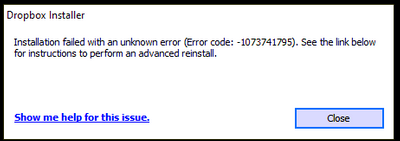
Installation Failed Error Code 1073741795
I keep getting the same error over and over again. I have tried every suggested resolution and nothing has worked. Anyone?
- 3 years ago
Our engineers have put out a new Beta Build: 150.3.4929, which fixes the 'Installation failure: Error code 1073741795'. You can find details about the fix, and how to install it, here.


Nancy Dropbox Community Moderator
3 years agoDropbox Community ModeratorHi everyone, welcome to the Community and apologies for any delays.
Sandman1001 and MRBUSBY, can you please provide a screenshot of the exact error you receive, so that I can have a visual?
Also, mtesta I’d like you to clarify what’s the exact OS version of your device.
Finally, AppoCaly, just to make sure you’ve all tried the same steps, have you also disabled any possible antivirus/firewall on your device, and the same issue still persists?
Let me know, and we'll take it from there.
Sandman1001 and MRBUSBY, can you please provide a screenshot of the exact error you receive, so that I can have a visual?
Also, mtesta I’d like you to clarify what’s the exact OS version of your device.
Finally, AppoCaly, just to make sure you’ve all tried the same steps, have you also disabled any possible antivirus/firewall on your device, and the same issue still persists?
Let me know, and we'll take it from there.

mtesta
3 years agoHelpful | Level 6
Thanks Nancy, here is my version and the exact error I get. I've tried turning off antivirus/firewall completely and same error.
Thanks!!
Mark
Windows 10 Enterprise ver 20H2
Build: 19042.1586
 Sandman10013 years agoNew member | Level 2
@nancy I get the exact same error as Mtesta. Windows 10 home build 10.0.19041
About Apps and Installations
Have a question about a Dropbox app or installation? Reach out to the Dropbox Community and get solutions, help, and advice from members.
The Dropbox Community team is active from Monday to Friday. We try to respond to you as soon as we can, usually within 2 hours.
If you need more help you can view your support options (expected response time for an email or ticket is 24 hours), or contact us on X, Facebook or Instagram.
For more info on available support options for your Dropbox plan, see this article.
If you found the answer to your question in this Community thread, please 'like' the post to say thanks and to let us know it was useful!


