Your workflow is unique 👨💻 - tell us how you use Dropbox here.
Forum Discussion

The TechJedi
4 years agoHelpful | Level 5
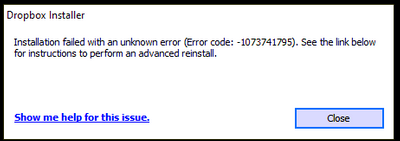
Installation Failed Error Code 1073741795
I keep getting the same error over and over again. I have tried every suggested resolution and nothing has worked. Anyone?
- 3 years ago
Our engineers have put out a new Beta Build: 150.3.4929, which fixes the 'Installation failure: Error code 1073741795'. You can find details about the fix, and how to install it, here.


yho123456
3 years agoHelpful | Level 6
Hi all,
I am also suffering from the this issue - both installers. It was not a serious problem until Dropbox (old version, which demands to update) now stops syncing because the version is out of date. This really is not o.k., many of the people who reported the bug warned for this issue in time and, like me, have a paid subscription but are not able to make use of Dropbox anymore.
I am running at:
Intel(R) Core(TM) i7-8700 CPU @ 3.20GHz 3.19 GHz
Also MSI motherboard with intel Z390 chipset.
Please Dropbox, this is a cry for help. This problem has become really urgent since sycing by old installations has been disabled.
Would it be an idea to ask the devteam to make a MSI install as temporary fix? This maybe also helps in debugging the issue. Or could you temporarily re-allow old installations to sync again?
kind regards,
Youri

Megan Dropbox Community Moderator
3 years agoDropbox Community ModeratorHi AppoCaly & yho123456!
Do you have an open ticket with our team about this maybe?
If you could go ahead and create one, that'd be amazing. Feel free to let me know so I can locate it on our system.
However, if you face any problems when trying to do so, let me know so I can help you out!
Thank you!
Do you have an open ticket with our team about this maybe?
If you could go ahead and create one, that'd be amazing. Feel free to let me know so I can locate it on our system.
However, if you face any problems when trying to do so, let me know so I can help you out!
Thank you!
- Emmet3 years ago
Community Manager
Our engineers are aware of the 'Installation failure: Error code 1073741795'. We apologize for this inconvenience and are working to find resolution.
- yho1234563 years agoHelpful | Level 6
Thanks @Megan, I probably wouldn't have found that link just on myself. I have reported the issue and mentioned that I am willing to help test things if this is helpful to the dev team.
 mtesta3 years agoHelpful | Level 6
I can't believe there is no resolution to this issue. . .I'm seriously contemplating using a different service. I need to have access to my data on all my devices. This is nuts.
- Megan3 years ago
Awesome job there, yho123456! Thank you for taking the time to mention it here, and also for helping out the team with this! 😊
Also, mtesta, please bear with us. I know this isn't ideal, but our team is working hard in order to get this resolved. I'll definitely make sure to update you when I hear back from them.
If you need anything else, let me know.
 humus3 years agoHelpful | Level 6
Any news from the dev team?
- mtesta3 years agoHelpful | Level 6
Seriously, this needs to be addressed. It's been weeks.
- Megan3 years ago
Hi everyone, I hope you're all doing well!
As JenTo correctly mentioned, we will update this (and any other related threads) once we hear back from our Team about the issue. Trust to know we won't leave you hanging!
In the meantime, feel free to share your ticket number here, so I can locate it on our system. If you don't have one, you should be able to open it, by visiting this page from an incognito tab on your browser if you're using a Basic account.
A normal tab if you are using a paid plan. If you have any issues doing so, let me know and I can help you out.
Thank you for your time guys!
 mastamack3 years agoExplorer | Level 3Hey my Ticket number is #16505395
as you mentioned we should leave our numbers here @Megan .
Same issue already since a couple of weeks 😕- Megan3 years ago
Thank you for the ticket number, mastamack!
I can see that the agent that worked on your case, asked for a screenshot in order to continue troubleshooting. However the ticket seems to have been closed due to inactivity because you didn't respond back.
Can you try submitting a new one?
Thanks!
- mtesta3 years agoHelpful | Level 6
Can you check my ticket as well. There has been no movement on this at all.
#16096099
 Andrew6293 years agoHelpful | Level 5My ticket number for this issue is 16226075.
- yho1234563 years agoHelpful | Level 6
16212401
- Megan3 years ago
Hey guys, thank you all for sending me your ticket numbers!
I've located all of them, and passed your comments to the agents working on your case.
I appreciate your patience, while our Team is looking into this. If you have any other questions, I am always one post away.
- JenTo3 years agoHelpful | Level 7
At the beginning of May I downloaded and attempted to install the full Windows offline installer 147.4.4800 which ended in the same error as before.
Following the failure, I contacted Support to ask if there was any progress and was told that this version (147.4.4800) should have fixed the issue, however, it didn't for me.
- JenTo3 years agoHelpful | Level 7
Yes, I did let them know.
 mwochoa3 years agoHelpful | Level 5
Is there an update to this issue? It it starting to cause an issue with our business continuity as many of our users are not accustomed to having to switch between the web or the S mode.
- yho1234563 years agoHelpful | Level 6
I was asked by the dev-team to run a command line install and send back the stack-trace to them, and so I did. Let's pray this contains helpful information for them to debug 🙂
- mwochoa3 years agoHelpful | Level 5
Nothing yet. So far they're asking me to send error logs for an app that won't install.
- AppoCaly3 years agoHelpful | Level 6Such a major issue and Dropbox does not seem to care... 😞
I will ask again - Can you please at least extend the support of old versions so they will sync again? 120.x worked perfectly fine. - Walter3 years ago
Hey AppoCaly, thanks for the nudge on this.
I just wanted to let you know that the team is still working on this and we'll let you know once we have an update to share.
In the meantime, you can try older builds of our desktop app from this page, but note that they'd automatically update to the latest version eventually.
Cheers!

About Apps and Installations
Have a question about a Dropbox app or installation? Reach out to the Dropbox Community and get solutions, help, and advice from members.
The Dropbox Community team is active from Monday to Friday. We try to respond to you as soon as we can, usually within 2 hours.
If you need more help you can view your support options (expected response time for an email or ticket is 24 hours), or contact us on X, Facebook or Instagram.
For more info on available support options for your Dropbox plan, see this article.
If you found the answer to your question in this Community thread, please 'like' the post to say thanks and to let us know it was useful!


