Your workflow is unique 👨💻 - tell us how you use Dropbox here.
Forum Discussion

The TechJedi
4 years agoHelpful | Level 5
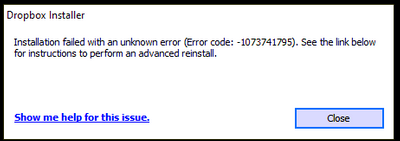
Installation Failed Error Code 1073741795
I keep getting the same error over and over again. I have tried every suggested resolution and nothing has worked. Anyone?
- 3 years ago
Our engineers have put out a new Beta Build: 150.3.4929, which fixes the 'Installation failure: Error code 1073741795'. You can find details about the fix, and how to install it, here.


Hannah Dropbox Community Moderator
3 years agoDropbox Community ModeratorThanks for the nudge here, Kyle mcGill.
If you're not able to uninstall Dropbox, please follow these steps:
- Open the "Task Manager" by right-clicking the taskbar and clicking "Start Task Manager".
- Click "Processes", to see if there are any processes associated with Dropbox, that might be preventing it from being uninstalled. (You may need to click "Show processes from all users" to check all processes)
- If you see any Dropbox processes, click on the line that references the process to select it and click on "End Process"
Once this is done, try to uninstall once again, to see if it works.

Kyle mcGill
3 years agoExplorer | Level 4
Hmm, the only process I see in the list from Dropbox is when I attempt an uninstall:
Clicking "end process/task" gets me this:
Launching the troublshooter retries the uninstall only to get the same result- an uninstall failure.
- Nancy3 years ago
Hey Kyle mcGill, hope you don’t mind if I jump in.
Since the same issue persists, I can open a ticket for you and send it over to your Community email address.
Let me know if that’s alright.
- Kyle mcGill3 years agoExplorer | Level 4
Sure Nancy, thank you.
I'll keep an eye out for it.- Nancy3 years ago
I just opened a ticket for you!
When you’ve got some time, please reply back to me, and we’ll further check this.
Cheers.

About Apps and Installations
Have a question about a Dropbox app or installation? Reach out to the Dropbox Community and get solutions, help, and advice from members.
The Dropbox Community team is active from Monday to Friday. We try to respond to you as soon as we can, usually within 2 hours.
If you need more help you can view your support options (expected response time for an email or ticket is 24 hours), or contact us on X, Facebook or Instagram.
For more info on available support options for your Dropbox plan, see this article.
If you found the answer to your question in this Community thread, please 'like' the post to say thanks and to let us know it was useful!


