Your workflow is unique 👨💻 - tell us how you use Dropbox here.
Forum Discussion

The TechJedi
4 years agoHelpful | Level 5
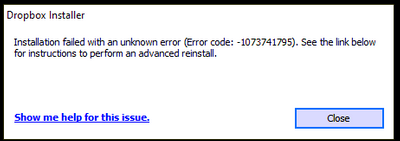
Installation Failed Error Code 1073741795
I keep getting the same error over and over again. I have tried every suggested resolution and nothing has worked. Anyone?
- 3 years ago
Our engineers have put out a new Beta Build: 150.3.4929, which fixes the 'Installation failure: Error code 1073741795'. You can find details about the fix, and how to install it, here.


mwochoa
3 years agoHelpful | Level 5
Is there an update to this issue? It it starting to cause an issue with our business continuity as many of our users are not accustomed to having to switch between the web or the S mode.

Walter Dropbox Community Moderator
3 years agoDropbox Community ModeratorHey mwochoa, thanks for the nudge and sorry to hear you're having issues with this.
If you haven't reached out to our Support team yet, may I reach out via email to have a further look into this matter with account and device specific information?
 yho1234563 years agoHelpful | Level 6
I was asked by the dev-team to run a command line install and send back the stack-trace to them, and so I did. Let's pray this contains helpful information for them to debug 🙂
About Apps and Installations
Have a question about a Dropbox app or installation? Reach out to the Dropbox Community and get solutions, help, and advice from members.
The Dropbox Community team is active from Monday to Friday. We try to respond to you as soon as we can, usually within 2 hours.
If you need more help you can view your support options (expected response time for an email or ticket is 24 hours), or contact us on X, Facebook or Instagram.
For more info on available support options for your Dropbox plan, see this article.
If you found the answer to your question in this Community thread, please 'like' the post to say thanks and to let us know it was useful!


