Your workflow is unique 👨💻 - tell us how you use Dropbox here.
Forum Discussion

The TechJedi
4 years agoHelpful | Level 5
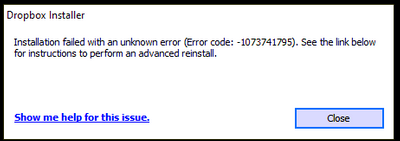
Installation Failed Error Code 1073741795
I keep getting the same error over and over again. I have tried every suggested resolution and nothing has worked. Anyone?
- 3 years ago
Our engineers have put out a new Beta Build: 150.3.4929, which fixes the 'Installation failure: Error code 1073741795'. You can find details about the fix, and how to install it, here.


Walter Dropbox Community Moderator
3 years agoDropbox Community ModeratorHey AppoCaly, thanks for the nudge on this.
I just wanted to let you know that the team is still working on this and we'll let you know once we have an update to share.
In the meantime, you can try older builds of our desktop app from this page, but note that they'd automatically update to the latest version eventually.
Cheers!

yho123456
3 years agoHelpful | Level 6
Thanks Walter. The point being raised by several of us now is that Dropbox has deliberately disabled the protocol used in older versions, which is why everyone who cannot upgrade also cannot sync for almost two months now. Reverting this would at least give us the possibility to sync our data. This is why this has been requested multiple times but has yet not been responded to from a technical point of view.
About Apps and Installations
Have a question about a Dropbox app or installation? Reach out to the Dropbox Community and get solutions, help, and advice from members.
The Dropbox Community team is active from Monday to Friday. We try to respond to you as soon as we can, usually within 2 hours.
If you need more help you can view your support options (expected response time for an email or ticket is 24 hours), or contact us on X, Facebook or Instagram.
For more info on available support options for your Dropbox plan, see this article.
If you found the answer to your question in this Community thread, please 'like' the post to say thanks and to let us know it was useful!


