Need to see if your shared folder is taking up space on your dropbox 👨💻? Find out how to check here.
Forum Discussion

Jsurland
11 months agoNew member | Level 1
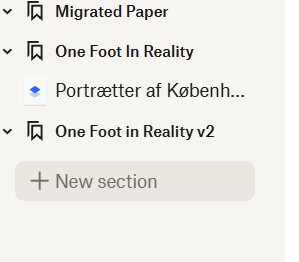
The new Dropbox Paper UI doesn't allow me to adjust the navigation column
So I use Dropbox paper EXTENSIVELY and the new upgrade is not working my way.
I get that the Paper is now a part of the file system. I can browse the folder using a file exporer and double clicking...

Jsurland
11 months agoNew member | Level 1
I might add, that I have used Dropbox Paper since the very early days.

Jay Dropbox Community Moderator
11 months agoDropbox Community ModeratorHi Jsurland, thanks for messaging the Community.
This is the current method used for navigating your Dropbox Paper documents within their folders, and it isn't possible to increase the column width.
We haven't been able to duplicate the part where the scrollbar moves to the center when you click anywhere. Which browser are you using, and is this the same on other browsers?
This will help me to assist further!
- Jsurland11 months agoNew member | Level 1
Hi Jay,
Thanks for your quick reply. I am using Microsoft Edge on Windows 11. When I load a document it reloads the tree and reposition itself. My tree is 3-4 levels deep and has slightly long names.
Resizing the sidebar, is that on the roadmap?
--Jacob
- Jay11 months ago
Currently, we don't have any information on future updates or changes to the Dropbox site, or what is on the roadmap.
We do appreciate your feedback on the website interface, and we take all comments into consideration when improving the Dropbox site and services.
- Jsurland11 months agoNew member | Level 1
Hi Jay,
Thanks for your reply.
I cannot work with it as it is - I will find an alternative and migrate. A shame after the many years of happiness with a perfectly clean and simple, yet powerful tool.
--Jacob
About Apps and Installations
Have a question about a Dropbox app or installation? Reach out to the Dropbox Community and get solutions, help, and advice from members.
The Dropbox Community team is active from Monday to Friday. We try to respond to you as soon as we can, usually within 2 hours.
If you need more help you can view your support options (expected response time for an email or ticket is 24 hours), or contact us on X, Facebook or Instagram.
For more info on available support options for your Dropbox plan, see this article.
If you found the answer to your question in this Community thread, please 'like' the post to say thanks and to let us know it was useful!


