Need to see if your shared folder is taking up space on your dropbox 👨💻? Find out how to check here.
Forum Discussion

JuanHerrero
7 years agoHelpful | Level 6
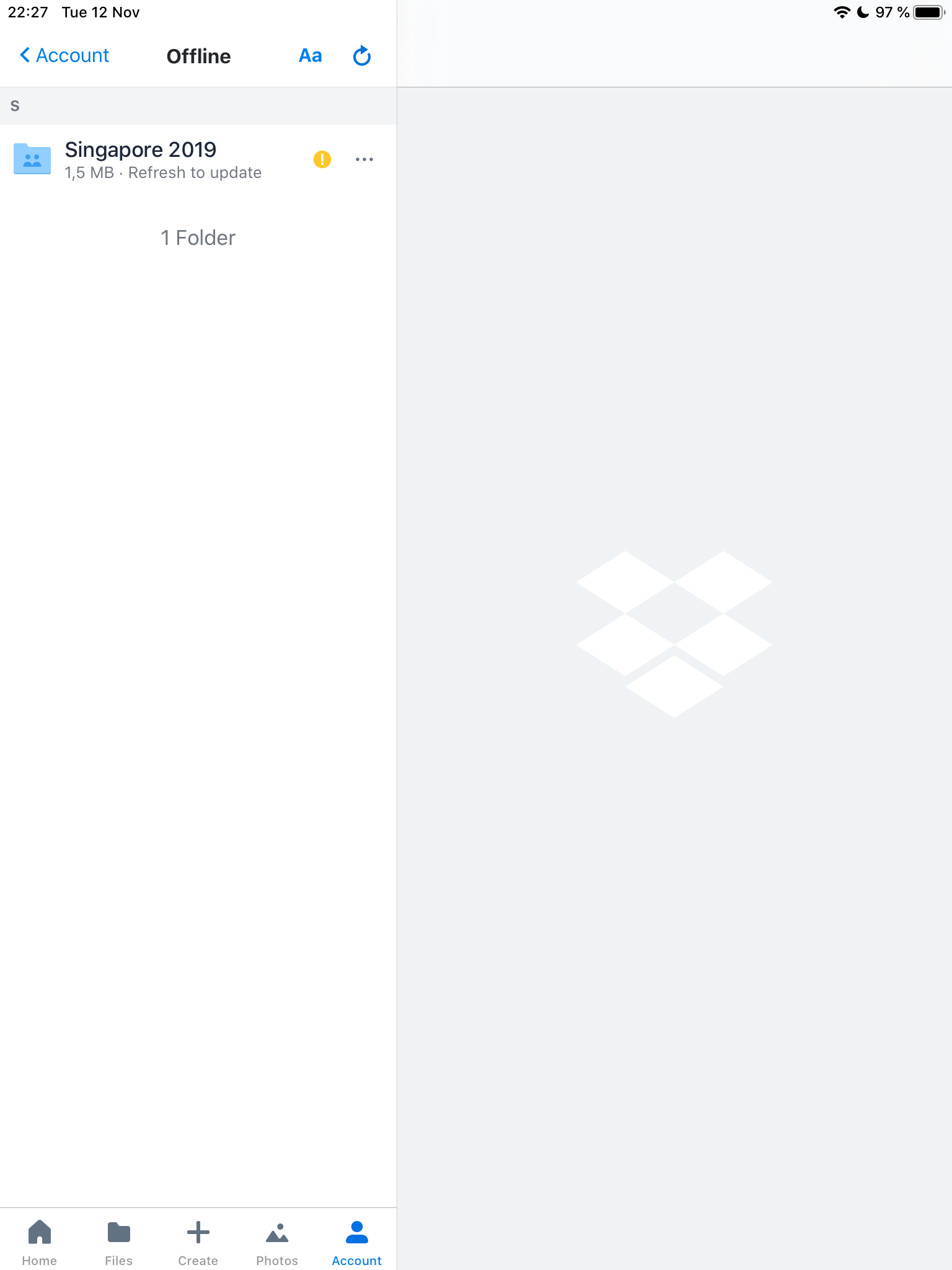
What does 'refresh to update' on my offline files mean? How can I do it?
I have a number of folders set as "Make available offline" on my iPad. Generally this works fine, but sometimes I get the yellow exclamation mark icon and "Refresh to update". Can someone please tell me what "Refresh to update" means - there is no refresh button and no refresh option in the menu. What am I supposed to do???
I just find out that for dropbox version 142.2, you can refresh by going to Account --> Manage Offline Files --> on the top right hand coner, there is a refresh logo.
61 Replies
Replies have been turned off for this discussion
 cgh0017 years agoExplorer | Level 4
That might work for you in a subfolder but it doesn’t for me (also on iPad and VERY frustrated by this LONG standing issue) and it certainly doesn’t address the issue when it refers to an individual file.
I’ve been a Dropbox Premium user since almost Dropbox launched and this issue is absurd - one of the worst I’ve seen with them and it’s been around far too long. C’mon guys WTF!?!
- Lusil7 years ago
Dropbox Staff
Hey peeps, thank you for your ongoing reports on this!
DB_Is_Broken, apologies for missing your post here. I just wanted to let you know that I was able to locate your support request and have passed your comments to the member of my team reviewing this for you.
cgh001, I'll do my best to help out on this.
As a first step, could you please let me know if you've tried going to the Manage Offline Files option in your Account tab and tapping on the refresh icon that's on the top right corner of your screen?
Let me know how it goes!
- mfalkvidd7 years agoHelpful | Level 5
I went to Account - Offline files and pressed the circle-arrow button, but there is still an yellow exclamation mark.
- Pan0547 years agoHelpful | Level 6
We’re now on version 166.2 on iPad, using the latest OS and the problem is still there, or getting worse. Directories that were downloaded (green icon), seem to be downloaded again. The refresh suggestion does not seem to do anything useful. going into all subdirectories is not always a viable solution, maybe a fairly coarse bandaid.
Any chance of some useful feedback about the status of this problem and estimated solution time for your paying customers?
- DJC17 years agoNew member | Level 2
This is a problem that has been around on Dropbox for years, and yet when you call them, they seem to be perplexed about the issue.
I have described for them the exact issue which is described here. I have upgraded to Business Advanced, I have reinstalled the App.
The problem is that if I happen to be out of internet connectivity when Dropbox gives the Yellow Exclamation point, then it shows NONE of my files. The reason I want a local copy on the iPad is so that I have a version of the document when I can't be connected to the Internet.
Dropbox needs to resolve this issue.
- Lusil7 years ago
Hey everyone, thanks for your reports!
The team is aware and looking into this. Thanks again!
- Peachey6 years agoHelpful | Level 5
C’mon... it’s now been 8 months and this issue still isn’t resolved! I reckon I’m going to give it another 2 weeks before I cancel my account and move over to another provider. This is a key feature, but it doesn't even work :(
- Pan0546 years agoHelpful | Level 6
Indeed, nothing seems to happen. Some more info: many of the 'permanent' files on my ipad seem to be reloaded over and over again, even if NO changes were made to the files at all.
Enjoy Xmas, hopefully this gets resolved before the next one, but I'm not holding my breath (anymore).
- DB_Is_Broken6 years agoHelpful | Level 5
Lusil, this has been a problem for many people including myself for a long time now.
You all over at Dropbox have enough info from all the complaints. You know this is a problem
You have a feature that people are paying for that is not working.
Fix it, or just flat out tell people that Dropbox has made a consious business descision to no longer support this feature and stop wasting people's time.
- Pan0546 years agoHelpful | Level 6
Don’t think anyone is listening anymore and the local files situation is only getting worse with the constant download of unchanged files.
I'm now testing OneDrive and so far the local copies seem to work as expected, but it is ealy days yet. The upload is as slow, if not slower, than DB (yes, that IS possible). I haven't tested synching or customer support, but I'll keep this forum informed of my findings.
If OD works as expected, I'll exercise the only right that seems to be left to DB customers: walk.

About Apps and Installations
Have a question about a Dropbox app or installation? Reach out to the Dropbox Community and get solutions, help, and advice from members.
The Dropbox Community team is active from Monday to Friday. We try to respond to you as soon as we can, usually within 2 hours.
If you need more help you can view your support options (expected response time for an email or ticket is 24 hours), or contact us on X, Facebook or Instagram.
For more info on available support options for your Dropbox plan, see this article.
If you found the answer to your question in this Community thread, please 'like' the post to say thanks and to let us know it was useful!


