Your workflow is unique 👨💻 - tell us how you use Dropbox here.
Forum Discussion

Mabone
8 months agoHelpful | Level 6
Windows Explorer persistent red X syncing error icon next to my Dropbox files.
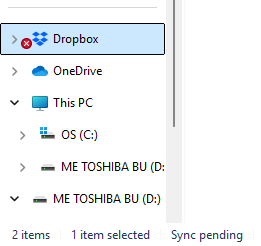
Hi, we use Windows Explorer to access Dropbox from our laptops. When opening Dropbox in Windows Explorer, I get a persistent red icon like this showing in the Dropbox root folder:
I think this...
 7 months ago
A BIG HUGE thank you to everybody who replied. I tried most of the options suggested. The problem seems to have rectified itself. Not sure what happened but it seems to be fine now.

ADours
7 months agoNew member | Level 2
Wanted to chime in as we also use Dropbox in our environment. We are noticing extensive issues regarding users going back and forth between indexing and syncing. The number randomly jumps to over 300,000 files, then back down to a few, and then back up again. (this number isn't static across all users, it varies). We've modified the folder selections to only sync certain folders since they are very large. However, a bunch of our users are experiencing the red "x" next to their Dropbox folders inside of file explorer. Any insight would be great.

Hannah Dropbox Community Moderator
7 months agoDropbox Community ModeratorThanks for the nudge here, ADours, and sorry to see that people on your team are having this issue.
Generally, a red circle with a white “X” means that a file or folder in someone's Dropbox folder can’t update or sync.
Does pausing and then resuming the sync process help at all?
What if the folder is moved out of the Dropbox folder and then moved back in?
- ADours7 months agoNew member | Level 2
Pausing and resuming does not rid the x's in file explorer. I have uninstalled Dropbox, reinstalled, selected specific folders, assured the folders are syncing "online" only as well. I haven't moved the folder out of Dropbox since a ton of people use the folder and was afraid it would affect all users. Whenever i check Dropbox for sync status, it says there are no errors at all. Also, whenever I go down the file path attempting to find what file/folder in the parent folder is causing the sync issue, it shows all the files are syncing within the folder that has the red X if that makes sense.
- ADours7 months agoNew member | Level 2
Also, i ensured the user has enough C drive space: well over 250GB extra while the folders live Online.
- Hannah7 months ago
Thanks for clarifying, ADours.
I would definitely suggest moving the files out of the Dropbox folder and then back in.
I understand this might be inconvenient, however, you can try it with a couple of test files first, to check if it actually helps.
Move them out of the Dropbox folder and back in and if that doesn't work, try copying them back in and let us know if it works.
Just make sure that the files in question are set to "available offline" before doing anything.
About Apps and Installations
Have a question about a Dropbox app or installation? Reach out to the Dropbox Community and get solutions, help, and advice from members.
The Dropbox Community team is active from Monday to Friday. We try to respond to you as soon as we can, usually within 2 hours.
If you need more help you can view your support options (expected response time for an email or ticket is 24 hours), or contact us on X, Facebook or Instagram.
For more info on available support options for your Dropbox plan, see this article.
If you found the answer to your question in this Community thread, please 'like' the post to say thanks and to let us know it was useful!


