Your workflow is unique 👨💻 - tell us how you use Dropbox here.
Forum Discussion

Xavier Montaner
1 year agoHelpful | Level 5
I'm working with Adobe Lightroom Classic and Dropbox doesn't sync some .db files
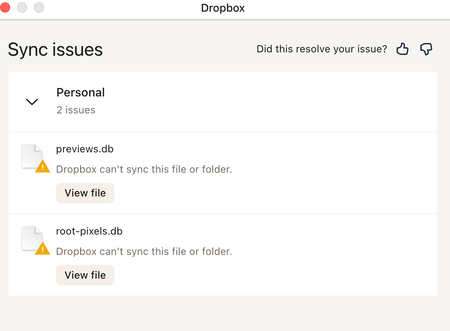
Hi everyone. Using Lightroom Classic and Dropbox. I am getting messages from Dropbox that some preview files can sync. See attached. Also when I sync again folders with my computer thumbnails are...
 1 year ago
Hi everyone!
Quick update:
The data transfer was successful. I deleted the old data, and now everything is working again with Lightroom - the error message about synchronization issues is gone.
Thank you very much for the help and have a great weekend.
Best regards,
Carina

Xavier Montaner
1 year agoHelpful | Level 5
Thanks Megan. I did and the issue still there. I also restarted the computer... Same issue... it has been going on for months on and off. Mosty on. I think the whole think started when Dropbox made an upgrade affecting Apple equipment: the Dropbox folder was then located in a newly created "CloudStorage" folder...
Xavier Montaner
1 year agoHelpful | Level 5
I have also noticed the following when using the "Space Lens" Utility in my hardrive... Besides the Dropbox folder there is another one named "Group Containers" that I have no idea what it is. Intentionally I don't keep much in my hard drive... Only software and my live Lightroom files for editing... I am not an expert but the combination of Dropbox and Lightroom Classic may be creating the "monster / hidden" folder that takes a lot of space in my hard drive...
About Integrations
Get help with third-party integrations from the Dropbox Community.
The Dropbox Community team is active from Monday to Friday. We try to respond to you as soon as we can, usually within 2 hours.
If you need more help you can view your support options (expected response time for an email or ticket is 24 hours), or contact us on X, Facebook or Instagram.
For more info on available support options for your Dropbox plan, see this article.
If you found the answer to your question in this Community thread, please 'like' the post to say thanks and to let us know it was useful!


