Your workflow is unique 👨💻 - tell us how you use Dropbox here.
Forum Discussion

CaptainPablo
2 years agoNew member | Level 2
Can't log in "Previous sign-in interrupted" error
As it says above ... Can't log in "Previous sign-in interrupted" error.
Any help appreciated.
It's a business account if that makes any difference.
- 2 years agoHi everybody,Appreciate your comments here. We’d like to share some key takeaways from this discussion.If you’re getting the ‘’ “Previous sign-in interrupted" error’’ please check if you hit the device limits of your account:
- Dropbox Basic users can be logged into up to three devices at a time.
- Dropbox Plus, Family, Professional, and Essentials customers can log into as many devices as they need.
- Dropbox team users can log into as many devices as they need, but admins on Advanced, Business Plus, and Enterprise teams can limit the number of devices their teams can link.
Actions to take:- Unlink some, or all your devices. Instructions in here.
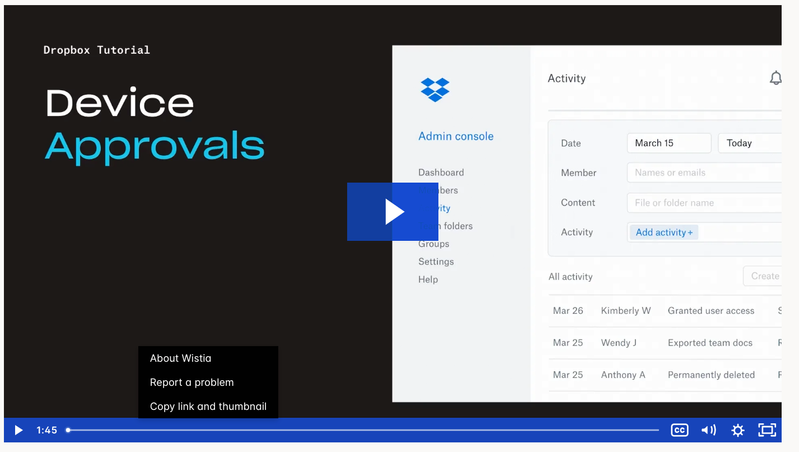
- Request your company Team Admin to manage your devices via the admin console:
Tip 🎯: they can use the Exception list to allow only you to have more than one connected computer.Video Tutorial here.This is the most recent info we've got for now. To keep things clear on the topic, we will be closing off this thread. If you’re still having issues, please start a new discussion and we’ll look into it!Thanks,Sam


Hannah Dropbox Community Moderator
2 years agoDropbox Community ModeratorHey guys, if you're still having this issue, can you please clear the cache of the browser that's opening when you're prompted to sign in and then try to sign in again.
Also, if you have any browser extensions from another tab/window, please temporarily disable those too.
Disabling any proxies, antivirus, firewalls, VPN, etc. might help as well, so please try that too.
 johnnybrav02 years agoExplorer | Level 4
RESOLVED!
After numerous attempts I was finally able to log in. I completely cleared cache (making sure to close all browser tabs) and turned off all browser extensions. I then installed the software and tried logging into my personal account first rather than business account. That was successful. When I tried to log into my business account, I received an error that I already had dropbox on too many computers. So I had to log out of one of those before I could sign into the business account on the desktop app. I suspect that was the reason I couldn't log in previously. I had been focused on logging into the business account since that's what I primarily use.
 jkleinhoven2 years agoHelpful | Level 5
I am having sync-issues on my MacBook for months; files added to dropbox offline are not longer synced to my online Dropbox. I have done over 10 reinstalls, cleared caches, tried 2 different browser and I am still not able to get a local Dropbox app installed.
- Nancy2 years ago
I’m sorry to hear this, jkleinhoven.
Can you send me the exact OS version of your computer?
Can you also clarify if you’ve tried our offline installer, as well?
- jkleinhoven2 years agoHelpful | Level 5
MacOS 13.6
that offline installer is what I tried 10 times or so is giving me the error as stated in the Subject field
- Hannah2 years ago
Hey igaming, I did see your screenshots, did you check the troubleshooting steps I provided above?
They seemed to help johnnybrav0.
Make sure to try them as well, jkleinhoven!
 igaming2 years agoHelpful | Level 5
Hi Hannah yes, I did try them and no, they didn't work.
Great that johnnybrav0 is sorted but he's using a Windows machine and I'm using a Macbook.
- Nancy2 years ago
Hi again, igaming. Can we log a ticket for you then, and send it over to this email address?
Our support team can look into this on their end.
- igaming2 years agoHelpful | Level 5
Hi Nancy I already have a ticket open - number 22778315. Frustrating that it's taking so long to get this sorted.
Not impressed with Dropbox CS, I'm afraid. Seems to move at a snail's pace. Why someone can't just call me to get this sorted I don't know. We pay a fortune for Business Membership.
 Syed Rafay2 years agoExplorer | Level 3
Dear Hannah.
We in our organization , are also facing the same issue which is a Previous Sign in Error , on our machines which are running windows 11 OS
Troubleshooting already done :
-Unlinked old Devices
- Turned off early access
- tried offline Installer
Please be informed that i have already raised a ticket Ticket #22771686 , but no solution till now .
- Hannah2 years ago
Hey Syed Rafay, sorry to hear about this.
From what I can see from your ticket, the agent working on your case is waiting for your response.
Please make sure to check the email chain and get back to the agent, so they can assist you further.
Have a great day!
 Maddux2 years agoHelpful | Level 6
I am not able to sign to Dropbox.
I have migrated to a new laptop (WIN 11) and once I have installed the app and logged in successfully, a warning message prompts to me saying that a previous sign in is interrupted. I also have read two related articles in this community forum but none of the suggested actions works for me.
Thank you for the support.
- Megan2 years ago
Hi there Maddux, sorry to hear you're having issues with this.
Do you have a free Basic Dropbox account? If so, can you check your security page, to make sure you don't already have 3 devices connected to your account?
Can you also clarify if you’ve tried our offline installer, as well?
A screenshot of the exact error you're getting would also help!
Let me know more!
- Maddux2 years agoHelpful | Level 6
Hi Megan, thanks for your response.
I just verfied that one 1 device is connected to my account. Also, I tried the offline installer with no success.
- Maddux2 years agoHelpful | Level 6
Hi, I have solved the issue.
What I did is to install dropbox in my phone. There, is an option where you can link your account to a PC.
I just followed instructions and somehow it worked.
Regards.
- mbarron2 years agoExplorer | Level 3
I have resolved my issue. I unlinked all accounts, cleared cache, and then re-downloaded the app and it worked.
 Paarthurnax2 years agoExplorer | Level 4
This worked for me, I gave it a last ditch effort. Made sure I had a free device slot available to add, then used the dropbox app on my phone and followed the connection steps, downloaded and installed Dropbox (even though I hadn't even uninstalled it from beforehand), and it bypassed the sign-in step and let me continue setting up Dropbox like normal. Thank all for the help!
 BenLind2 years agoNew member | Level 2
Maddux wrote:Hi, I have solved the issue.
What I did is to install dropbox in my phone. There, is an option where you can link your account to a PC.
I just followed instructions and somehow it worked.
Regards.
Thank you! I had tried everything here, clearing cache, different browsers, offline installer, unlinking devices (even though I don't have a free account which should support more devices) and the mobile linking was the only thing that worked. I was skeptical at first as it only seemed to download yet another installer but this one already automatically connected to my account and it worked.
Thanks again, this was driving me nuts!
Nadav1 did you try using that installer? I was skeptical at first too as it was only downloading another installer but that seemed to connect immediately.
- stevenlewis2 years agoExplorer | Level 4
Windows 10 desktop app user and Admin for a Team account. I've tried everything in this entire thread. I've got my team device limits to unlimited. I've tried removing 2-factor auth requirement, removing devices, etc. No matter what I do, once a user logs out of the app they cannot log back in and get the "Previous sign in interrupted" message over and over. I removed my connected mobile device trying to see if that would allow me to login on my desktop pp but that didn't work and now my mobile app won't let me login again either. This HAS to be a known issue by now with Dropbox. I have 3 users including myself right now that cannot use DB at all and this is killing our productivity as all of our project folders live in DB for our entire team. Can't be an IT issue on our side as not limited to a specific device, network, or even mobile or desktop app. 3 of us have called in with this issue multiple times in the past 2 weeks. We desperately need support!
- Walter2 years ago
Hi there stevenlewis - thanks for flagging this with us.
Since you've already contacted our support team about this, could you share your ticket ID so that we can look it up in our system?
- stevenlewis2 years agoExplorer | Level 4
I was able to fix this issue. I found an older version of the DB app. V181.4.5678 online. This version used a method to sign in directly in the installer instead of taking me to the web browser. I was able to sign in and get DB running again with no issues. There could be an issue with the new method of using the browser to sign in that the developers need to look into.
 Rohit Patel2 years agoHelpful | Level 5
Why can't you make it simple ? update the version, is it rocket science ?
- prestonp2 years agoNew member | Level 2
Disabling browser extensions is what fixed it for me. I had Dropbox Passwords and another Google extension in Chrome and I had to disable both.


About Security and Permissions
Find answers to your questions about Dropbox account security and permissions.
The Dropbox Community team is active from Monday to Friday. We try to respond to you as soon as we can, usually within 2 hours.
If you need more help you can view your support options (expected response time for an email or ticket is 24 hours), or contact us on X, Facebook or Instagram.
For more info on available support options for your Dropbox plan, see this article.
If you found the answer to your question in this Community thread, please 'like' the post to say thanks and to let us know it was useful!


