Your workflow is unique 👨💻 - tell us how you use Dropbox here.
Forum Discussion

BaliThai
3 years agoHelpful | Level 6
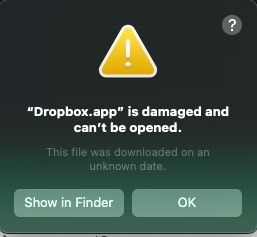
Updated Mac to OS 13.2 - Error Message that "Dropbox.app is damaged and can't be opened"
I just upgraded my Mac Studio to OS 13.2 Ventura (from Monterey). I had logged on as a local administrator to do this. Upon logging out as the local admin and logging back in as the user, I received ...
 2 years ago
So to just complete this thread - the advanced uninstall/reinstall didn't work - in that the terminal commands did not work. Our IT department finally got involved and we finally just did an uninstall (steps 1 - 2 of the advanced instructions for Mac), had to go into Activity Monitor to manually force quit the Dropbox.app again, did step 3, skipped step 4 and just downloaded Dropbox for Mac, installed it and it is now working. No one was sure why step 4 did not work for us, but at least I have it up and working! Thank you for all of your help.
BaliThai
3 years agoHelpful | Level 6
Yes. For my three devices, I have my work computer, my home computer and my phone. It is my work computer that is having the issue. I have not yet updated my home computer to Mac OS Ventura 13.2.

Jay Dropbox Community Moderator
3 years agoDropbox Community ModeratorOkay, then it shouldn't make a difference in this instance, since uninstalling the app would result in it being removed from the devices list.
I'd recommend uninstalling it from the admin account just in case, since it was installed from there.
- BaliThai3 years agoHelpful | Level 6
Any recommended ways to go about uninstalling the app? I read some discussions here about concerns about uninstalling the app might delete files or there could be difficulties in uninstalling the app? Since I can't access the desktop app, I do not know if I had the automatic computer backup selected (which appears to be the issue some of the time). I also don't know enough about this to know if any of these scenarios could be a problem for me.
Thank you!
https://www.dropboxforum.com/t5/Integrations/Unable-to-Uninstall-Reinstall-Dropbox/m-p/440489#M4487
- Jay3 years ago
You can check if your backups are enabled from this page on your account.
An advanced reinstall would be the best way to go about this, since it would fully remove the app from your device and unlink it at the same time, allowing you to reinstall it under the user account.
Once the app is installed, the files on the site would sync down to your machine again in the Dropbox folder in the user account.
- BaliThai2 years agoHelpful | Level 6
So to just complete this thread - the advanced uninstall/reinstall didn't work - in that the terminal commands did not work. Our IT department finally got involved and we finally just did an uninstall (steps 1 - 2 of the advanced instructions for Mac), had to go into Activity Monitor to manually force quit the Dropbox.app again, did step 3, skipped step 4 and just downloaded Dropbox for Mac, installed it and it is now working. No one was sure why step 4 did not work for us, but at least I have it up and working! Thank you for all of your help.
About Apps and Installations
Have a question about a Dropbox app or installation? Reach out to the Dropbox Community and get solutions, help, and advice from members.
The Dropbox Community team is active from Monday to Friday. We try to respond to you as soon as we can, usually within 2 hours.
If you need more help you can view your support options (expected response time for an email or ticket is 24 hours), or contact us on X, Facebook or Instagram.
For more info on available support options for your Dropbox plan, see this article.
If you found the answer to your question in this Community thread, please 'like' the post to say thanks and to let us know it was useful!


