Your workflow is unique 👨💻 - tell us how you use Dropbox here.
Account Settings
580 Topics
How can I get people to access an account, and to edit a file on my account?
I'm brand new here and looking to do something very basic and simple. But have no clue what I am doing. I'm with a group called NAPS (Nebraska Association of Nebraska Santas). Yes a group of about 30 Santas. It's just a social club. We get together once a month, have meal and talk about Santa stuff. I'm looking to set something up for the group where we can place a few documents for everyone in the group to access. Membership roster, meeting minutes, etc. So far, I've started a free account (we have no dues, so we have no money). I want to set the account up so the default is that everything is read only, with a couple of people that have edit access. Also, to be able to change a single document to edit access to all. Also, trying to figure out once we send out emails, pointing to the account. What happens as each person clicks the link? Do they have to se tup an entire account to gain access? (keep in mind, we are a lot of old guys with limited computer experience. I'm trying to keep this as simple as possible) I've been looking over the documentation and such, but it's overkill. Much more complex than I need, so I'm getting lost in the technical jargon. Help? (it will help put you on the Nice list :) )58Views0likes6Comments
Dropbox not syncing to Apple folders (Desktop, Documents, Downloads)
Device MacBook Air M4 Operating System/Browser (if using the web) Sequoia, Tahoe Dropbox App Version (if using the app) 241.4.4853 Dropbox Plan Family Question or Issue My files are on Dropbox online. I now need to download them to my Mac (I've tried this on both a Tahoe and a Sequoia machine). Although the Mac already has Desktop, Documents and Downloads folders, the Dropbox app creates a new parallel set of (virtual) folders under the same names, residing in the Dropbox folder (~/Library/CloudStorage/Dropbox. In the past Dropbox used to sync with the existing Apple folders, but that's not been the case since a few OS X/Dropbox versions. It is my understanding that the parallel folders are supposed to be there, but Mac would mirror these, to make it look like they are in the `Apple folders. It makes no difference whether either File Provider and/or Backup is on or off. How do get rid of this double folder issue?41Views0likes2Comments
My files aren't syncing. Is my app connected to the right account?
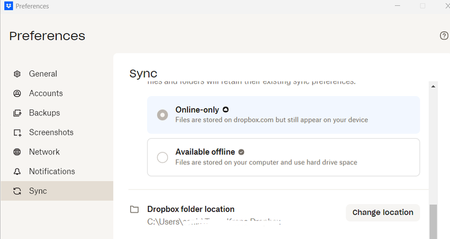
I am a new employee to a company. The previous employee had a dropbox acct on the same computer that I use, however my files are not syncing with the other team members for the company. When I open preferences below is the dropbox folder location which is that of the previous employee. How can I resolve this issue?178Views0likes21Comments
Migrating from Dropbox Basic to Dropbox Plus
Hello , Can anyone give me the perfect instructions on how to best migrate from Basic to Plus? Note : My Basic and Plus don't have the same email addres, so they are different accounts but on the same Drive D. I currently have two Dropbox entries on my D drive: for convenience, let's say Dropbox Basic and Dropbox Plus. I use Basic daily, so all files there are currently up to date. Is it now a matter of copying all the files in Basic-Folder to Plus-Folder? I tried this, by the way, but it wasn't successful. The files were described in text in the Plus destination folder, but otherwise empty. There must be a workable method for this, right? Thanks in advance for your reply. Ruud186Views0likes15Comments
Feature Request: Support Multiple Dropbox Business/Teams Accounts (Multiple Tenants) in Desktop App
Hi Dropbox team — I’m posting this as both a long-time Dropbox user and a business owner. Today, the Dropbox desktop app only allows seamless use of one Business (Teams) account (plus optionally one Personal account). This creates a major problem for users who legitimately operate across multiple organizations. Real-world use case Many professionals today are involved with multiple companies at the same time, including: Business owners with multiple entities Holding companies with multiple subsidiaries Consultants / advisors supporting multiple clients Board members and fractional executives PE / investment professionals working across portfolio companies In these cases, we often need separate Dropbox Business tenants for security, compliance, and clean separation. The key point I am not asking for a workaround or a discount. I am willing to pay for multiple Dropbox Business subscriptions — but Dropbox currently does not provide a seamless way to run multiple Business accounts in the desktop app. What competitors already support Microsoft OneDrive/SharePoint supports multiple tenants cleanly, for example: OneDrive – Company A OneDrive – Company B Both sync simultaneously and appear natively in File Explorer/Finder. Dropbox currently forces users into clunky workarounds like: Using the browser for the second tenant Switching accounts repeatedly Creating separate OS user profiles Running virtual machines These are not realistic solutions for modern workflows. Why this matters This limitation is not a “nice-to-have.” It is a core enterprise usability issue and increasingly a deciding factor for businesses choosing between Dropbox and Microsoft 365. Dropbox is losing a valuable segment of customers who are willing to purchase multiple accounts — but cannot do so efficiently due to desktop client limitations. Requested solution Please add support for: Multiple Dropbox Business/Teams accounts logged in simultaneously Separate synced folders per tenant Seamless switching and visibility in Finder/File Explorer Clear tenant labeling and separation Even supporting 2+ Business tenants would solve a massive problem for many professionals. Bottom line Dropbox is an excellent product, but this is a fundamental gap. Many of us want to keep using Dropbox and expand our usage across multiple businesses — but we need Dropbox to support the reality of multi-tenant work. Thanks for considering this — I would strongly encourage Dropbox to prioritize this feature. Edward Cook Co-Founder, McCarthy Cook & Co. We were the first landlord of Dropbox's HQ at China Basin in SF and owner of Castro Station in Mountain View where you used to work. Come back to the office! You will be closer to your PAYING customers! I'm happy to double the amount we pay you monthly for new and better access and continue with Dropbox while you pursue true productivity gains harnessing AI46Views1like1Comment
Dropbox Community rank notifications
I have my dropbox community notifications set up the way I want them - except that there does not seem to be an option to turn on/off emails telling me "You have earned a new rank in The Dropbox Community!". There is an unsubscribe button at the bottom of the email but it just takes me to My Settings: | The Dropbox Community where there is nothing about ranks. I have "earn a new badge" set to Never.93Views0likes7CommentsHaving issues accessing my 2fa code. What can I do to be able to sign into my account?
for some reasons i havestopped using dropbox for a year now i need to regain access on my account but i can not access authenticator app generating 2fa codes for the account now is it possible to verificate from email instead of the 2fa code as i no longer have access to it and the account is important to me31Views0likes1CommentUnlink Dropbox app version 2.3.5.10 from Android handset
Hello, I have an old android handset - HTC- One with Dropbox app version 2.3.5.10. I am unable to unlink device from Dropbox. A message occurs Error: ' you must be online to unlink. Check your connection or try again'. However, I am connected to WiFi. I can access the website on my other devices laptop and mobile, but the old handset is not listed on the basic Dropbox account I have. Appreciate if you can advise please. Thanks47Views0likes1Comment