Your workflow is unique 👨💻 - tell us how you use Dropbox here.
Download
602 Topics
I exceed my Dropbox Basic account's quota and can't restore or download my files now.
Dropbox Plan Basic Device IphoneXR Operating System/Browser (if using the web) IOS 18.7.4 Dropbox App Version (if using the app) Web online (Safari & Opera GX v3.1.1) Question or Issue Dropbox emailed me asking to upgrade. I can’t. I need to recover my data & export to another cloud service. I don’t succeed neither to export or win load the files directly. I can’t make any backup neither except by upgrading. please help I want to solve the issue by recovering all my data on my hardwares at least or export a single somehow. Instruction & help are more than welcome. Thank you!104Views0likes11Comments
How can I download a large folder to my external usb stick?
Device Macbook Air M2, 2022 Operating System/Browser (if using the web) (macOS Tahoe Version 26.3) Dropbox App Version (243.3.6860) Question or Issue If anyone can hop on a video call and help me download large 'camera uploads' folder (96GB), 26K mostly images/some videos to external usb stick I'll happily transfer $20! First formatted external hard drive to exFAT but tediously slow having to download files as zip in download folder only and then copy to external hard drive. Tried to set up as APFS with no luck. Getting all sorts of error messages every different workaround I try. If anyone could walk me through it via video call I would really appreciate it. Other folders are no issue to copy/transfer.Solved88Views0likes10Comments
Displaying HTML links as raw code. Is there a workaround?
It seems that when you sent a link to an HTML file, whereas I can view it just fine, nobody else can, they get raw code. I understand that this was a deliberate policy. So, is there a workaround? Is there a link to a download possible? If I myself want to download it's fine, but what about others?Solved91Views0likes4CommentsRemove login popup when sharing a link to download
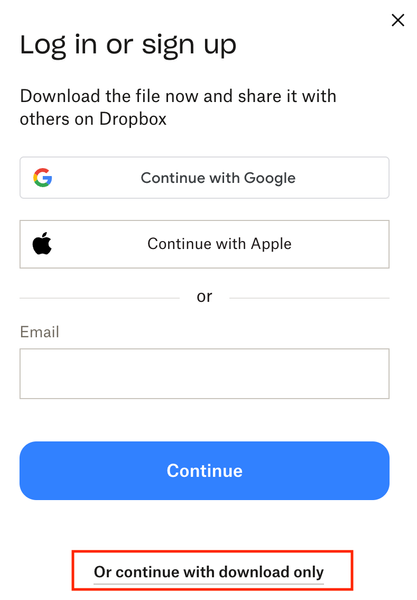
Remove this very frustrating sign in popup. We're all getting sick of our customers and clients asking "can you give me access" or "we dont have a dropbox login" or "can you share it with XYZ" USERS: please like this post so dropbox considers listening. We're paying customers, stop using us as marketing to get more people to sign up. This is the reason we're looking at Sharepoint as an agency. 1 - turn it off 2 - or add a setting to turn it off for PAYING customers 3 - stop locking the topics about it: https://www.dropboxforum.com/discussions/101001014/remove-loginsignup-dialog-box-from-shared-link-download/757059 https://www.dropboxforum.com/discussions/101001012/remove-log-in-or-sign-up-popup-when-downloading-from-a-shared-link/775697 https://www.dropboxforum.com/discussions/101001012/disable-banners-and-popups-for-shared-folders/843215 https://www.dropboxforum.com/discussions/101001014/remove-loginsignup-popup-window-from-dropbox-transfer-link/767931 Remove Login/SignUp dialog from download flow when sharing link to files | The Dropbox Community https://www.dropboxforum.com/discussions/101001014/my-clients-need-to-download-files-via-link-but-the-download-button-isnt-really-v/845332 https://www.reddit.com/r/dropbox/comments/1ft6pyo/remove_log_in_or_sign_up_popop_when_downloading/ Bookmark this post as this image above is very handy to send to your customers as support.52Views0likes1Comment
How can I download my files from the Dropbox website?
How do I contact a human being & get my data off this piece of **bleep** site before you delete my 500GB of data, since you made me a Team & quintupled your price & I've been homeless & peripatetic for 6 years & without an income for 8 years & you are holding hostage all the vestiges of a life I once had & liked?57Views0likes1Comment
How can I download multiple photos at once?
My main use is to post photos and have friends download them. I know about the ability to download any folder you are currently in. I know how to download a single photo. But I have not found the way to select and download multiple photos at a time. I'm hoping there's a way that I have not found. Please tell me!Solved61Views0likes2CommentsOffline archives on micro SD external card on Android device
Good morning, I recently bought an Android e-ink reader, and the internal storage is only 64GB, which isn't very much. It has a microSD card slot (up to 1TB), and I'd like offline files to be downloaded to the card, as the device has quite limited storage capacity and I'll be using large PDF files with audio. Any ideas on how to do this? Thank you very much.77Views0likes5Comments
Mac Download Issue: Dropbox Video Stops at 90–95% and Freezes in the end
Device (Mac M1) Operating System/Browser (if using the web) macOS15.7 Dropbox Browser Version in chrome Question or Issue I have a large video file (about 2 hours, 39 Gb). On the Dropbox platform, I can watch the full video without any issues. However, after downloading it to my Mac, it seems the download does not complete 100% (only about 90–95%), even though macOS shows the download as successful and complete. When I play the file in QuickTime Player, the last part freezes. The first time I downloaded it, the last 15 minutes froze; on the second attempt, it was only the last 8 minutes. Is there another way to download the file, such as a compressed ZIP or multipart archive, or to crop the video so I can download just the final 8 minutes? Note: I have enough capacity in my storageSolved108Views0likes3Comments