Your workflow is unique 👨💻 - tell us how you use Dropbox here.
Preview
31 Topics
Ipad and Iphone viewing of long file names
Our company is having the issue that on the mobile app (using the ipad or iphone) often times the file name is too long to properly view what we are opening. I want to be able to read the entire file name so I know what i am opening since many of the beginning and last parts of the file are exactly the same for filing purposes so I want to be able to view the file name without having to open each one in order to find out. I'm hoping I make sense. Is there something I'm missing where I'm able to do this? I can't "right click" on the file name cause I'm mobile otherwise I would try that 🙂Solved32KViews22likes112Comments
Audio Player Repeat Option
As a film and TV composer, are use dropbox exclusively for sharing and listening to files. It would be super amazingly handy if the player had a repeat button. Often times I want to listen to a certain cue over and over and this would make it extremely handySolved5.4KViews7likes11Comments
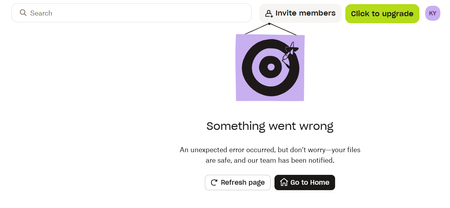
I'm unable to view my files on the web as I'm getting a 'something went wrong' error
Help, I'm unable to view my dropbox files. When I log in, it just keeps displaying the following error message. I've tried on different browsers, incognito mode, different wifi networks. Nothing works. This is getting me real worried.205Views4likes11Comments
Safari 16.1 (macOS Ventura) cannot access Dropbox files
Safari cannot open the page.The error is: "The operation couldn't be completed. (kCFErrorDomainCFNetwork error 1.)" (kCFErrorDomainCFNetwork:1) Dropbox recently moved itself to "a safer location", i.e., ~/Library/CloudStorage/Dropbox. Everything was fine. Afterward, I upgraded macOS to 13.0 (Ventura). Safari is now ver 16.1 and cannot open html files stored in Dropbox. All other apps appear to be quite happy with cloud versions of Dropbox files, including Chrome, TextEdit, macVim, Terminal, etc. Probably something minor, but not sure what.Solved6.3KViews3likes28Comments
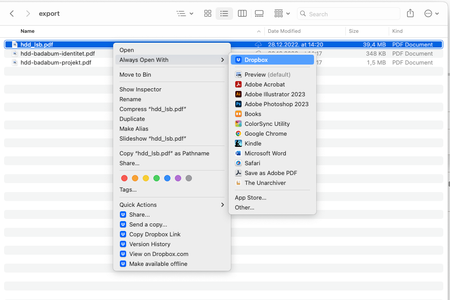
After latest Dropbox update, documents on Mac are set to open with Dropbox by default
MacBook Pro M1 with the MacOS Ventura 13.1 installed. I use the Dropbox Plus plan, and I predominantly access files through my Finder app. The Dropbox app notified me of the new update — I installed and waited for everything to sync and index. Now everytime I try to open a file from Finder (tried with .png, .pdf, .ai, .jpg and several other random filetypes), the system attempts to open the file with Dropbox, and nothing happens (the file doesn't open in the application it's supposed to open in by default). I have to go to the "Open With" right-click menu and select the proper application by hand everytime, which is a tad annoying. Screenshots of Dropbox appearing on top of the "Open With" menu below, both with an "online-only" and an "available offline" dowloaded file. Thanks in advance, D.5.8KViews2likes38Comments
Finder and Dropbox desktop app not showing file preview
Hey guys, I just recently switched from Google Drive to Dropbox for Business. Finder on Mac OS 10.14 Mojave and the new dropbox desktop app won’t show file previews of my files, just the Apple default preview logo. However on the iOS app and on the web file previews show. This is a big deal for me because google drive offers this. My team has to have this or we won’t continue to use Dropbox. If anyone has any solutions please advise. I tried closing and opening the app and force quitting using activity monitor. Best Derek8.5KViews2likes16CommentsCan’t open PDF, Docs, txt files on iOS
I can’t view my .pdf, .docs, .txt files. I haven’t a tried other extensions. I can open and view photos though. When I go to Dropbox app —> files —> open .pdf file —> it loads forever. (Spin wheel) The problem started around 2019 Jan 13. I am on iOS version 12.1.2. I am on Dropbox app 126.2.2. I am on a paid user of Dropbox. I have restarted iPhone a couple of times. I have deleted Dropbox and reinstalled a couple of times. I checked and there isn’t any new iOS updates available. Could someone help me?8KViews2likes10Comments
VIBRATE on video play/pause/scrub after update.
Every single time I play/pause or scrub on a video, the app sends a vibrate "haptic feedback" when I never asked for this. It happened during the last auto-update when the user interface changed as well. I'm tired of it and looked in the mobile app settings, notifications, within the website settings and on my phone as well. I'm sick of it buzzing every single time I press a button. Nowhere else on my phone does this happen and I cannot find a toggle option to disable it. Someone please tell me you can disable this.Solved2.9KViews1like12Comments
Dropbox iOS app playing audio twice (double); glitch still present after latest UI update
I use Dropbox for audio playback a lot, mostly MP3 files. This audio glitch (explained in more detail below) has been present in the iOS Dropbox app for a long time now. After a recent UI overhaul the new iOS interface looks great but the doubled audio glitch is somehow still unresolved. In fact, it’s worse now, since it happens every time I open the app and start audio playback. The audio glitch happens when starting playback of an audio file (MP3 for example) in the Dropbox iOS app. Audio starts playing, and a few seconds later, it starts playing again from the beginning while the original sound continues, so that the same audio is playing twice simultaneously with a few seconds delay between the two. It seems to have something to do with the fact that in iOS you can control playback from two different places: the Dropbox app UI, and the iOS Control Center UI. It seems as if each one generates its own playback without taking into account the other one, so both play at the same time. I have never seen a similar problem in any other iOS app that has audio playing capabilities. I urge the Dropbox dev team to give more priority to this persistent issue that’s been present for a long time now. iPhone 14 Pro Max, iOS 16.4.1, Dropbox app version 324.2Solved2.9KViews1like11CommentsIs there a way to run the Dropbox app in the background on my iPhone?
Hey everyone, I just switched to an Android from an iPhone. I am facing a feature problem that I loved on my iPhone! Which is, if I open up an audio file from my dropbox app I can just do other stuff on my phone. On android however, it stops playing whenever I switch over to a different app. Is there a way to let it run in the background just like the iPhone? Thanks!3.7KViews1like9Comments