Our Community is in read-only mode until April 8th, learn more here. You can still search existing threads or get help via Dropbox Support, the Dropbox Help Center, or Learn.
iOS
31 Topics
Dropbox for iOS cannot be installed.
Application Affected dropbox for ios Device iphone 15 pro max Operating System/Browser (if using the web) ios 26.2、26.2.1、26.3 Dropbox App Version (if using the app) (for ios 460.2) Question or Issue Ios 26.2, 26.2.1, 26.3 cannot be installed. After clicking on the app store, turn around, and then return to get it. It can't be installed. I called apple customer service and replied that the application was incompatible with 26.2. I asked for help in the community, hoping to solve it.181Views0likes8CommentsThe Dropbox mobile app is filling up my iPhone storage
I have had a Dropbox Plus account for several years. I have the latest version of the Dropbox app (460.2.2) installed on my iPhone with iOS 18.7.1. When I was unable to upgrade to the latest iOS version and when I could no longer backup my iPhone to iCloud, I found that copying photos and videos from my iPhone camera roll to specific folders in Dropbox, deleting those items from my iPhone camera roll, and then deleting all the items in the Recently Deleted folder in my camera roll did not free up storage on my iPhone. I cleared the Dropbox cache on my iPhone and confirmed that I did not have any offline files. However, I did find that the Dropbox Photos folder on my iPhone had copies of all the uploaded files. Consequently, moving photos and videos to the Dropbox cloud did not free up space on my iPhone. In the iOS Dropbox app, the Photos folder has copies of all the photos that were uploaded to specific folders in the Dropbox cloud. When I delete one of those photos from the Photos folder on the iPhone, the copy in the Dropbox cloud is also deleted! Note that in the iOS Dropbox app, I had "Camera uploads" "On" with the following pertinent settings: "Upload from" "Videos" (only that folder), "Save HEIC photos as" "JPG", "Save Live Photos as" "Live Photo". Though photos should not have been affected, I turned off Camera uploads. I ran the same test with the same result: a photo sent to a specific Dropbox folder appears (in HEIC format) in that Dropbox folder online as well as in the Photos folder in the Dropbox app on my iPhone; deleting the photo from the Photos folder in the iPhone Dropbox app also deletes the photo from the specific Dropbox folder in the cloud. The PictureEcho website recommends using the "Free Up Space" option in the iOS Dropbox app to delete the copies of the photos on the iPhone and not on the Dropbox cloud, but I cannot locate that option anywhere in the Dropbox app on my iPhone. Restarting the Dropbox app does not make a difference. Reinstalling the app including removing all the Dropbox data stored on the iPhone would solve the immediate problem but would not address the bigger issue: as-is Dropbox is only useful for sharing (unannotated) photos and videos that I don't mind also storing on my iPhone. Since I have a backup service for my (Windows) laptop, without a solution I'll go back to moving photos and videos from my iPhone to my laptop. This greatly diminishes the justification for paying for a Dropbox Plus account. The "Free Up Space" option would help but I question the multiple steps required. In iOS select two photos, upload to Dropbox, close the Dropbox upload window, reselect the two photos, delete, open the "Recently deleted" folder (album?) and delete the two photos (or delete all). In the Dropbox app on the iPhone, select "Free Up Space" and then (as needed) delete the cache. Then there's the issue of the comments added to a photo in iOS (apparently) not getting stored in Dropbox. In Dropbox online I can view a photo with the iOS HEIC extension and view the basic HEIC metadata, but I cannot view comments added in iOS. I can add comments in Dropbox but presumably those comments are not visible in iOS (or on my Windows laptop) outside of the Dropbox app or website.331Views0likes10Comments
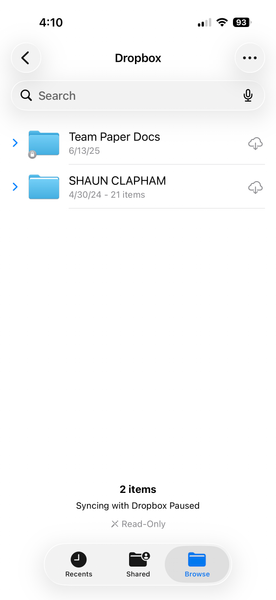
I'm trying to add Dropbox as a location in Files app, but it says syncing is paused.
I cannot use dropbox as a location to select files from on iphone ios 26.2.1 I have restarted, installed everything over and over. Removed preview app, and nothing. Application Affected dropbox on iphone Device iphone 17 pro ios 26.2.1 Operating System/Browser (if using the web) files iphone app Dropbox App Version (if using the app) 460.2.2 Question or Issue Need a solution140Views0likes2Comments
iPod won't Connect to my Dropbox account.
Hello. I have an iPod running iOS 12.5.8. When I try to login to my account using the iOS app I get the following error, "Unable to Connect to Dropbox There may be a problem with your iPod's internet connection". There is no problem w/ my internet connection. I can connect to the internet fine. When I try to login from my iPod using Google I get an 'invalid" email address error. I know this email is correct b/c I can log in from my desktop. This used to work fine but suddenly stopped working. And yes I tried deleting and reloading the app and it still does not work. I don't have cellular data options on this iPod.230Views2likes6Comments
“Syncing with Dropbox paused” error when I access my Files app on iPad
I have an iPhone SE2 and iPad Air 5th generation. When I go to files app, under Dropbox it shows Syncing with Dropbox paused. This is only happening on my iPad and works fine on iPhone. I have seen similar discussion here and the situation looked exactly the same. The solution there was to simply open the preview app. I’ve try using the preview app on iPad but it still hasn’t changed. What am I possibly doing wrong? I’ve tried most of other basic solutions, including removing Dropbox app and reinstalling it, signing out and in. Background app refresh is on. Files are loading, but still shows syncing paused. *iPhone SE2: iOS 26.2, Dropbox version 454.2.2, storage left on the device around 40GB (88GB/128GB used) *iPad Air 5th generation: iPadOS 26.2, Dropbox version 454.2.2, storage left on the device around 20GB (44GB/64GB used) *dropbox: basic, 1.3GB/2.25GB used, above two devices connected *region: JapanSolved389Views0likes3Comments
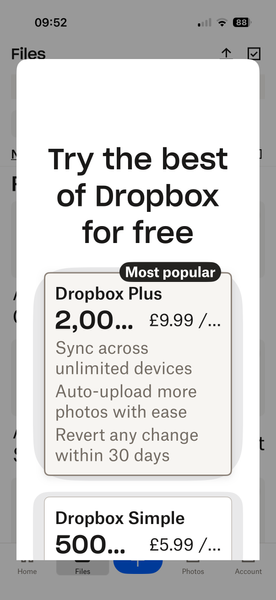
Mobile app on iOS frozen due to an ad pop-up
hi, I have recently found that when opening my dropbox app on my iPhone 16 pro, after about 5 secs the screen is filled with the dropbox advert 'Try the best of Dropbox for free' this covers the whole screen and there is no way of shutting it down. See the screenshot below. Any suggestions apart from the normal, log out log back in again, would be gratefully received. Thanks, JillSolved150Views0likes4Comments
I'm scanning documents with color on my iOS app, but they're coming out as black and white.
Application Affected scan Device iPhone 16 Pro Dropbox App Version 450.2.2 Question or Issue Suddenly my scans of color documents are black & white even after editing to Original. How can I get the scan of color file to be in color? EDIT: same issue when scanning file with iPad app - scan of color file/photo is black & white even in Original edit setting.221Views0likes2Comments
Enable ipadOS Dropbox app for Apple Vision Pro
Dropbox had to explicitly deny iPadOS app from installation on AVP as iPadOS apps are compatible and enabled by default. More than a year later and Dropbox still continues to keep the app blocked. At this point I will have to look at migrating to a different vendor for my cloud storage. I have yet to come up with any reasonable reason why Dropbox would make the decision to block their iPad app from installation on Apple Vision Pro.308Views1like6CommentsCan't attach Dropbox files to emails on iOS 15, app version 444.2.2
I'm unable to attach dropbox files to my emails from iphone 15 pro max. I have Dropbox app version 444.2.2 installed. I don't know if this is relevant, but I read that I should go to the "Files" app. When I do that, I see a screen that says at top "ALLOW FILES TO ACCESS" and below that it lists "Apple intelligence & Siri," "Search," and "Cellular Data."123Views0likes2CommentsHow can I remove items from the Viewed Links section in the Home tab of the mobile app?
Hi and thank you for reading. On my iPhone home screen, there is a section called Viewed Links which has two line items. I would like to delete one of those line items so I never see it again. I don't care about the original. I can't swipe left and when I click, it opens. There doesn't seem to be a Delete option. If I have to delete both, that's OK. Thank you for any guidance.379Views0likes1Comment