Your workflow is unique 👨💻 - tell us how you use Dropbox here.
Forum Discussion

ckjmm
3 years agoExplorer | Level 4
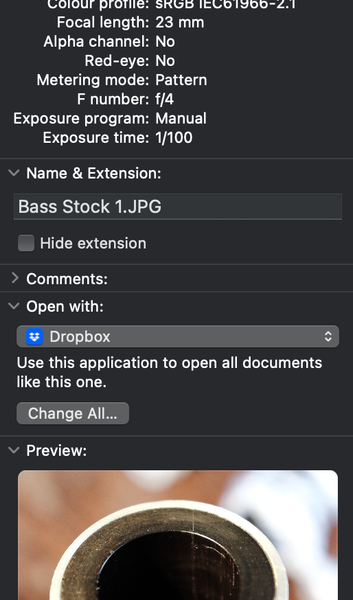
Clicking online-only files in new Dropbox (cloud storage location version) doesn't work
When you click on a file that has never been synced, MacOS tries to open the file using Dropbox as the default app which results in the file not opening. For a .jpeg you have to go into Get Info and ...

Jay Dropbox Community Moderator
3 years agoDropbox Community ModeratorHi ckjmm, thanks for bringing this to our attention.
We've not experienced this on our devices. In general, the OS itself should be able to determine the default app for which app to use to open files.
If it isn't doing so automatically, then there may be a setting on the system which has changed.
Have you tried changing the default apps on your machine to prevent this from occurring again?

ckjmm
3 years agoExplorer | Level 4
Yes, changing the default app doesn’t change it. Admittedly I am also running the public beta of Ventura 13.1 which has broken aliases to dropbox files. I’m only running the beta as Apple broke spotlight search in Mac mail in 13.0.1.
About View, Download, and Export

Get support with viewing, downloading, and exporting files and folders from your Dropbox account.
The Dropbox Community team is active from Monday to Friday. We try to respond to you as soon as we can, usually within 2 hours.
If you need more help you can view your support options (expected response time for an email or ticket is 24 hours), or contact us on X, Facebook or Instagram.
For more info on available support options for your Dropbox plan, see this article.
If you found the answer to your question in this Community thread, please 'like' the post to say thanks and to let us know it was useful!


