Your workflow is unique 👨💻 - tell us how you use Dropbox here.
Forum Discussion

PascalMahvi
2 years agoExplorer | Level 3
Getting an error when clicking on a folder on my Mac
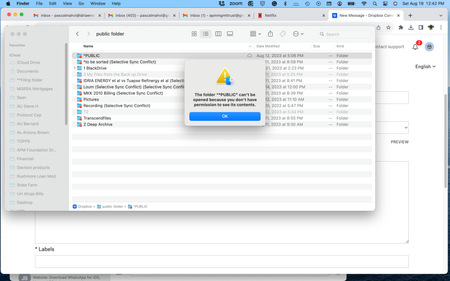
While I have access to my DB files online, when I click on the folder, it says "the folder XXXX can't be opened because you don't have permission to see the content" ! How can I fix the issue?
...
- 2 years ago
Hey PascalMahvi, sorry to hear you're having issues with this.
Could you please let me know the status and version of the desktop app as shown in your menu bar at the moment? Is it 'up to date' or still syncing?
Have you granted Dropbox full disk access as outlined here by the way?
Keep me posted, Pascal!

PascalMahvi
2 years agoExplorer | Level 3
Hi Walter
Hovering shows ver 180.4.4912
Uploading 1048
Downloading 37
When I right click - it will not show me make files available online
I see this
Then when I click further on public folder, I see this:

Walter Dropbox Community Moderator
2 years agoDropbox Community ModeratorThanks for the additional information PascalMahvi - most appreciated!
Is your desktop app 'up to date' now or still syncing in your menu bar? If it's the latter, has the number of files changed at all or is it stuck perhaps?
- PascalMahvi2 years agoExplorer | Level 3
Stuck at 1038 and 37
- PascalMahvi2 years agoExplorer | Level 3
stuck at 1048 (not 1038) and 37
- Hannah2 years ago
Hey Pascal, can you also make sure to give Dropbox full disk access, to see if that helps with syncing being stuck?

About View, Download, and Export

Get support with viewing, downloading, and exporting files and folders from your Dropbox account.
The Dropbox Community team is active from Monday to Friday. We try to respond to you as soon as we can, usually within 2 hours.
If you need more help you can view your support options (expected response time for an email or ticket is 24 hours), or contact us on X, Facebook or Instagram.
For more info on available support options for your Dropbox plan, see this article.
If you found the answer to your question in this Community thread, please 'like' the post to say thanks and to let us know it was useful!


