Your workflow is unique 👨💻 - tell us how you use Dropbox here.
Forum Discussion

officeemployee205
2 years agoExplorer | Level 3
How to turn on 'open in - Finder'
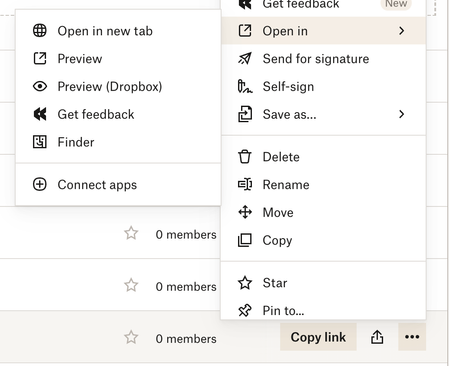
Some of my team members can't view the open in - finder tab. I want everyone to have this ability so when people share links with each other they can quickly switch to Finder and sync and ite...

Jay Dropbox Community Moderator
2 years agoDropbox Community ModeratorIt wouldn't work with shared links, since they're not tied to that user's account.
The Open in Finder option only applies to users when accessing files in their own Dropbox account via the site.

officeemployee205
2 years agoExplorer | Level 3
In this case they are tied to everyone's account. Many team members can do this no problem. But I'm having an issue where two of them can't even though we've given them access to those folders.
- Walter2 years ago
Hey officeemployee205, sorry to jump in, but could you check if those two members have stored those files locally on their device (i.e. available offline) or if they've set them to be online-only perhaps?
- officeemployee2052 years agoExplorer | Level 3
Hi Walter. That isn't relevant in this case. We share links to files with each other all the time across the team and it shouldn't matter if it's online only or synced to the local drive of that user's computer. In the cases when the files are online only (which for me is 90% of the time when people share file links with me). I simply go to more - open in - finder and then in the Finder window I'll sync my item like normal. This is what I'm trying to get to work for these team members, the "open in - finder" tab.
- Walter2 years ago
In that case, could you ask the people who are having issues with this to try clearing their browser's cache or using an incognito window or another browser?
Let us know how it goes officeemployee205

About View, Download, and Export

Get support with viewing, downloading, and exporting files and folders from your Dropbox account.
The Dropbox Community team is active from Monday to Friday. We try to respond to you as soon as we can, usually within 2 hours.
If you need more help you can view your support options (expected response time for an email or ticket is 24 hours), or contact us on X, Facebook or Instagram.
For more info on available support options for your Dropbox plan, see this article.
If you found the answer to your question in this Community thread, please 'like' the post to say thanks and to let us know it was useful!


