Your workflow is unique 👨💻 - tell us how you use Dropbox here.
Forum Discussion

officeemployee205
2 years agoExplorer | Level 3
How to turn on 'open in - Finder'
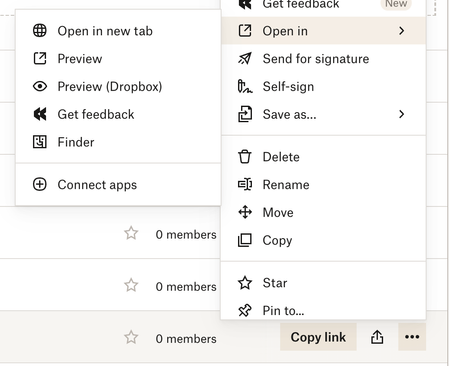
Some of my team members can't view the open in - finder tab. I want everyone to have this ability so when people share links with each other they can quickly switch to Finder and sync and ite...

officeemployee205
2 years agoExplorer | Level 3
Good idea. We tried both incognito as well as clearing cache and nothing resolved this issue.

danjley
2 years agoNew member | Level 2
Hey officeemployee205,
Was doing a little research myself, as I've been noticing same problem with my account. All started with the newer preview feature, in browser (I'm using Chrome) that's been around for a month or two now.
Then today, just after reading about your experience, I stumbled upon a workaround — if I close the left sidebar, using the "X" [close sidebar button], it automatically takes me to the nested folder location, still within browser at this point — but I'm now able to see the path to my familiar structure, which is the same as my in-finder structure.
At that point, I was able to click the three dot button, but now the "open in" menu is finally once-again including "finder" as an option. Hopefully you have same the luck.
Dan
About View, Download, and Export

Get support with viewing, downloading, and exporting files and folders from your Dropbox account.
The Dropbox Community team is active from Monday to Friday. We try to respond to you as soon as we can, usually within 2 hours.
If you need more help you can view your support options (expected response time for an email or ticket is 24 hours), or contact us on X, Facebook or Instagram.
For more info on available support options for your Dropbox plan, see this article.
If you found the answer to your question in this Community thread, please 'like' the post to say thanks and to let us know it was useful!


