Your workflow is unique 👨💻 - tell us how you use Dropbox here.
Forum Discussion

esk
2 years agoExplorer | Level 4
Recipient can't download a file on mobile without the app
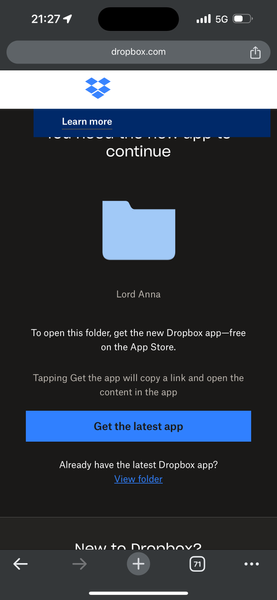
When I try to open a shared folder on mobile, the website asks me to install the app. I don't want to do that Edit: Screenshot:

Nancy Dropbox Community Moderator
2 years agoDropbox Community ModeratorHi esk! Welcome back to our Community.
Can you send me a screenshot of what you’re seeing exactly?
Are you accessing a folder that’s been shared with your Dropbox account, or a shared link instead?
Let me know when you’ve got more updates.
 esk2 years agoExplorer | Level 4
- I just attached a screenshot.
- I'm accessing a shared link.
- Nancy2 years ago
Thanks for the screenshot and the updates! Is the owner of the folder sending you a shared link with view-only permissions, or edit permissions instead?
- esk2 years agoExplorer | Level 4I don't know. I created the link by opening the folder in the iOS app, tapping the three dots, tapping share, and tapping copy link. There doesn't seem to be an edit option.
About View, Download, and Export

Get support with viewing, downloading, and exporting files and folders from your Dropbox account.
The Dropbox Community team is active from Monday to Friday. We try to respond to you as soon as we can, usually within 2 hours.
If you need more help you can view your support options (expected response time for an email or ticket is 24 hours), or contact us on X, Facebook or Instagram.
For more info on available support options for your Dropbox plan, see this article.
If you found the answer to your question in this Community thread, please 'like' the post to say thanks and to let us know it was useful!


