Your workflow is unique 👨💻 - tell us how you use Dropbox here.
Forum Discussion

Mumdoesthewashing
1 month agoNew member | Level 2
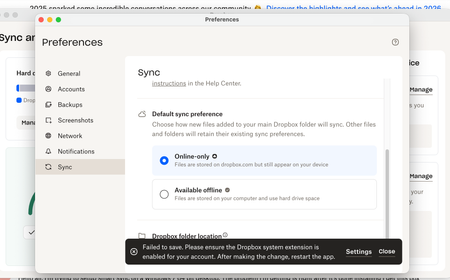
Error on switching back to available offline sync option
I am on MacbookPro M1 2020, running Tahoe 26.1. I have set the settings in Dropbox Admin to offline is enabled, my personal account is fine but my business account, for which I am admin will n...

vanzeller
1 month agoNew member | Level 2
Hi, the menu has changed in the latest macos, I suspect - the item you mentioned is not there. However I found it under Login items & extensions > Extensions. I attached another screenshot. Is that it?
I tried activating that slider, but for some reason when I open that menu item again its again turned off. I turned it on multiple times and when checking again it is always turned off. Furthermore, right after turning it on, nothing happens and I also cannot change the files to be available online.
About Create, Upload, and Share
Find help to solve issues with creating, uploading, and sharing files and folders with Dropbox.
The Dropbox Community team is active from Monday to Friday. We try to respond to you as soon as we can, usually within 2 hours.
If you need more help you can view your support options (expected response time for an email or ticket is 24 hours), or contact us on X, Facebook or Instagram.
For more info on available support options for your Dropbox plan, see this article.
If you found the answer to your question in this Community thread, please 'like' the post to say thanks and to let us know it was useful!


