Your workflow is unique 👨💻 - tell us how you use Dropbox here.
Forum Discussion

Frostbytes
1 year agoExplorer | Level 3
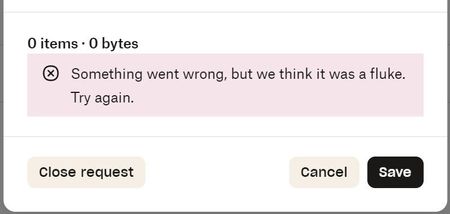
Issues with File Requests: "Something went wrong, but we think it was a fluke. Try again."
For the last two weeks, file requests fail when clients send us files, with both Mac and PC on multiple days. The same file requests previously worked, as recently as three weeks ago. The clien...

Megan Dropbox Community Moderator
1 year agoDropbox Community ModeratorI see, thanks for your speedy reply Numbersguy7777!
That's odd indeed. As for phone Support, it's only available to Business admins.
You can see more in regards to your Support options here. You can try contacting our Support about this, or if you come across any issues I'd be happy to open a ticket on your behalf in order for them to have a closer look into this.
Frostbytes
1 year agoExplorer | Level 3
Megan wrote:I see, thanks for your speedy reply Numbersguy7777!
That's odd indeed. As for phone Support, it's only available to Business admins.
You can see more in regards to your Support options here. You can try contacting our Support about this, or if you come across any issues I'd be happy to open a ticket on your behalf in order for them to have a closer look into this.
So now that it's not just me reporting this issue, will Dropbox take this seriously and find a resolution?
Two days ago an important client had me send them data using their file request and it also failed. It's clear that it's not just us having this problem.
 Numbersguy77771 year agoExplorer | Level 3
@Frostbytes quick note of the only solution I found to work was to find the email from dropbox that alerted me that the client had uploaded requested files, and to click on the link in that email that said "view files", and it took me directly to the folder for full access.
However I still cannot view the uploads in the normal folder when logging into dropbox. Hope that works for you
About Create, Upload, and Share
Find help to solve issues with creating, uploading, and sharing files and folders with Dropbox.
The Dropbox Community team is active from Monday to Friday. We try to respond to you as soon as we can, usually within 2 hours.
If you need more help you can view your support options (expected response time for an email or ticket is 24 hours), or contact us on X, Facebook or Instagram.
For more info on available support options for your Dropbox plan, see this article.
If you found the answer to your question in this Community thread, please 'like' the post to say thanks and to let us know it was useful!


