Need to see if your shared folder is taking up space on your dropbox 👨💻? Find out how to check here.
Forum Discussion

JPassioninc24
2 years agoExplorer | Level 4
'Your account is running out of storage' after trying to open a colleague's folder
How to fix this? My account is saying Your account is running out of storage when I tried to open a folder from my colleague

Jay Dropbox Community Moderator
2 years agoDropbox Community ModeratorHi JPassioninc24, thanks for bringing this to our attention.
Are you trying to add a shared folder to your account?
Does the folder have more data than your quota allowance, since shared folders do take up space on your own account?
This will help me to assist further!
 JPassioninc242 years agoExplorer | Level 4
Hi Jay, thanks for the response! My colleague send me an invite so I can add files to our company dropbox.
- Jay2 years ago
Was this an invite to a shared folder, or join a Dropbox team?
Could you attach a screenshot showing this invite, while hiding any personal names?
- JPassioninc242 years agoExplorer | Level 4
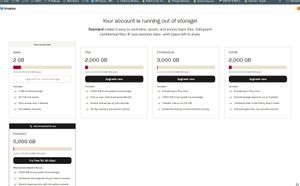
Here is the screenshot
About Storage Space
Looking for help with managing the storage space in your Dropbox account? Talk to the Dropbox Community and get advice from members.
The Dropbox Community team is active from Monday to Friday. We try to respond to you as soon as we can, usually within 2 hours.
If you need more help you can view your support options (expected response time for an email or ticket is 24 hours), or contact us on X, Facebook or Instagram.
For more info on available support options for your Dropbox plan, see this article.
If you found the answer to your question in this Community thread, please 'like' the post to say thanks and to let us know it was useful!


