Your workflow is unique 👨💻 - tell us how you use Dropbox here.
Forum Discussion

Cordeirovitor
5 months agoNew member | Level 2
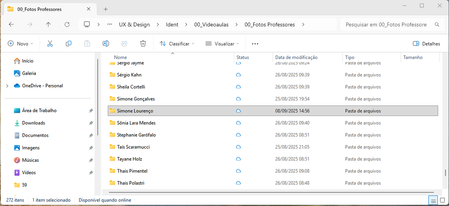
Folders and files status icons not working as intended on Windows
Application Affected Dropbox App for Windows Device Acer Helios Neo 16 Operating System/Browser (if using the web) Windows 11 24H2 Dropbox App Version (if using the app) 233.4.4901
Question ...
 5 months ago
I did the steps and it worked. This is what they've sent me:
- Log out of the Dropbox desktop app.
- Log back into the Dropbox desktop app.
- Click Open Dropbox.
- Make your selections on the onboarding screens.
- When the setup is finished, click Advanced settings from the final screen.
- Check the Opt out checkbox under Dropbox for Windows updates.
Cordeirovitor
5 months agoNew member | Level 2
I just got a message back from the support and the icons are going to be like this, since dropbox updated their windows app using a behavior determined by Microsoft. So, it's a dead end behave like it was on windows explorer. Maybe we can talk to Microsoft about it?💁♂️
I've asked the support how to go back to the previous version and when they respond, I'll post the steps here in case someone's having the same problem in the future.

Rich Super User II
5 months agoSuper User IICordeirovitor wrote:I've asked the support how to go back to the previous version and when they respond, I'll post the steps here in case someone's having the same problem in the future.
The ability to opt out of the Dropbox for Windows Update can be found in this help article. Just keep in mind that the update is not optional and you will eventually be forced to update again. Dropbox is rolling it out slowly, but it will eventually be rolled out to everyone.
 plutogenie5 months agoHelpful | Level 5
Those instructions didn't work for me. The option to opt out didn't appear. I think it is because I had already upgraded. It appears you need to do this BEFORE the upgrade. I assume that once the upgrade has occurred, it cannot be reversed?
- Cordeirovitor5 months agoNew member | Level 2
I did the steps and it worked. This is what they've sent me:
- Log out of the Dropbox desktop app.
- Log back into the Dropbox desktop app.
- Click Open Dropbox.
- Make your selections on the onboarding screens.
- When the setup is finished, click Advanced settings from the final screen.
- Check the Opt out checkbox under Dropbox for Windows updates.
- Cordeirovitor5 months agoNew member | Level 2
Thanks. That's good to know.
I've already been thinking to switch to box.com, since they have unlimited storage. This is probably the push from dropbox I was waiting.
About Apps and Installations
Have a question about a Dropbox app or installation? Reach out to the Dropbox Community and get solutions, help, and advice from members.
The Dropbox Community team is active from Monday to Friday. We try to respond to you as soon as we can, usually within 2 hours.
If you need more help you can view your support options (expected response time for an email or ticket is 24 hours), or contact us on X, Facebook or Instagram.
For more info on available support options for your Dropbox plan, see this article.
If you found the answer to your question in this Community thread, please 'like' the post to say thanks and to let us know it was useful!


