Your workflow is unique 👨💻 - tell us how you use Dropbox here.
Forum Discussion

The TechJedi
4 years agoHelpful | Level 5
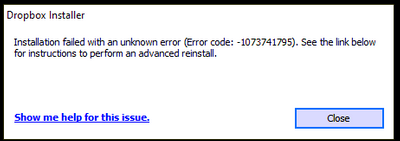
Installation Failed Error Code 1073741795
I keep getting the same error over and over again. I have tried every suggested resolution and nothing has worked. Anyone?
- 3 years ago
Our engineers have put out a new Beta Build: 150.3.4929, which fixes the 'Installation failure: Error code 1073741795'. You can find details about the fix, and how to install it, here.


MRBUSBY
3 years agoHelpful | Level 7
Please post if this issue has been resolved. @Walter seemed to identify an issue for my situation (ARM processor), but before I purchase a different computer with a different processor, I need to know that there is a solution to the problem. The other threads seem to indicate that the error occurs on computers which do not have an ARM processor.
I have been a Dropbox Professional (paid subscription) for 10+ years and would like to continue using the program vs moving to another app.
mtesta
3 years agoHelpful | Level 6
It's crazy that this is not fixed already
 Sandman10013 years agoNew member | Level 2
A day later and no one from drop box has gotten in touch to try and resolve the issue.
- Nancy3 years ago
Dropbox Community Moderator
Hi everyone, welcome to the Community and apologies for any delays.
Sandman1001 and MRBUSBY, can you please provide a screenshot of the exact error you receive, so that I can have a visual?
Also, mtesta I’d like you to clarify what’s the exact OS version of your device.
Finally, AppoCaly, just to make sure you’ve all tried the same steps, have you also disabled any possible antivirus/firewall on your device, and the same issue still persists?
Let me know, and we'll take it from there. - mtesta3 years agoHelpful | Level 6
Thanks Nancy, here is my version and the exact error I get. I've tried turning off antivirus/firewall completely and same error.
Thanks!!
Mark
Windows 10 Enterprise ver 20H2
Build: 19042.1586
- Sandman10013 years agoNew member | Level 2
@nancy I get the exact same error as Mtesta. Windows 10 home build 10.0.19041
 kodemonkey3 years agoExplorer | Level 3
Add me to the list. Intel i5-9600K 6 core, 16GB ram, Win 10.0.19043 Pro build 19043. MSI motherboard with intel Z390 chipset.
I have dropbox on 7 other devices with no issue. Was working fine until update. Did advanced re-install. Did an uninstall as well. tried advanced re-install again. Nothing seems to work.
- MRBUSBY3 years agoHelpful | Level 7
Hi Sandman1001 ...
There are at least three threads in this forum regarding the error code 1073741795. I am attempting to check each thread with some regularity looking for a resolution.
So far, it appears that the error has not been resolved, or at least it has not been posted in any of the threads in this forum.
- mtesta3 years agoHelpful | Level 6
Nancy requested information a few days ago and there has been no reply. I use this app daily and this delay is costing me time and energy. How can there not be a resolution to this. There have to be thousands of people who have the same issue. Can we PLEASE get a resolution???
 humus3 years agoHelpful | Level 6
I opened three different direct tickets by e-mail, each time I am contacted by e-mail, then I am referred to an expert, then I am offered to make very general corrections (disable the antivirus for example).
The latest build I manage to install is the 112
https://www.dropboxforum.com/t5/Dropbox-desktop-client-builds/Beta-Build-112-3-254/td-p/476277But when connecting, I am told to install the latest version.
with this software
https://www.oo-software.com/fr/ooregeditor
I looked for dropbox in the registar and I see that there are several hundred entries. maybe related to that.I completely removed bitdefender, I only use windows security now. Even temporarily disabling it doesn't change anything.
I even opened a thread at microsoft but the proposed steps didn't change anything
in any case the error is not linked to the processor.
there are at least 5 different threads for this issue:
other similar errors for other programs:
https://www.researchgate.net/post/How_do_you_solve_the_system_error_code_1073741795_in_Abaqus_6142https://stackoverflow.com/questions/53057591/importerror-dll-load-failed-with-error-code-1073741795
- mtesta3 years agoHelpful | Level 6
Yes, but they have not contacted me yet. Its why I posted here.
EDIT: Scratch that, he just sent me a note.
 AppoCaly3 years agoHelpful | Level 6Any news? I really need to get this working. 😞
 yho1234563 years agoHelpful | Level 6
Hi all,
I am also suffering from the this issue - both installers. It was not a serious problem until Dropbox (old version, which demands to update) now stops syncing because the version is out of date. This really is not o.k., many of the people who reported the bug warned for this issue in time and, like me, have a paid subscription but are not able to make use of Dropbox anymore.
I am running at:
Intel(R) Core(TM) i7-8700 CPU @ 3.20GHz 3.19 GHz
Also MSI motherboard with intel Z390 chipset.
Please Dropbox, this is a cry for help. This problem has become really urgent since sycing by old installations has been disabled.
Would it be an idea to ask the devteam to make a MSI install as temporary fix? This maybe also helps in debugging the issue. Or could you temporarily re-allow old installations to sync again?
kind regards,
Youri
- Megan3 years agoHi AppoCaly & yho123456!
Do you have an open ticket with our team about this maybe?
If you could go ahead and create one, that'd be amazing. Feel free to let me know so I can locate it on our system.
However, if you face any problems when trying to do so, let me know so I can help you out!
Thank you! - Emmet3 years ago
Community Manager
Our engineers are aware of the 'Installation failure: Error code 1073741795'. We apologize for this inconvenience and are working to find resolution.
- yho1234563 years agoHelpful | Level 6
Thanks @Megan, I probably wouldn't have found that link just on myself. I have reported the issue and mentioned that I am willing to help test things if this is helpful to the dev team.
- mtesta3 years agoHelpful | Level 6
I can't believe there is no resolution to this issue. . .I'm seriously contemplating using a different service. I need to have access to my data on all my devices. This is nuts.
- Megan3 years ago
Awesome job there, yho123456! Thank you for taking the time to mention it here, and also for helping out the team with this! 😊
Also, mtesta, please bear with us. I know this isn't ideal, but our team is working hard in order to get this resolved. I'll definitely make sure to update you when I hear back from them.
If you need anything else, let me know.
- humus3 years agoHelpful | Level 6
Any news from the dev team?
- mtesta3 years agoHelpful | Level 6
Seriously, this needs to be addressed. It's been weeks.
- Megan3 years ago
Hi everyone, I hope you're all doing well!
As JenTo correctly mentioned, we will update this (and any other related threads) once we hear back from our Team about the issue. Trust to know we won't leave you hanging!
In the meantime, feel free to share your ticket number here, so I can locate it on our system. If you don't have one, you should be able to open it, by visiting this page from an incognito tab on your browser if you're using a Basic account.
A normal tab if you are using a paid plan. If you have any issues doing so, let me know and I can help you out.
Thank you for your time guys!
 mastamack3 years agoExplorer | Level 3Hey my Ticket number is #16505395
as you mentioned we should leave our numbers here @Megan .
Same issue already since a couple of weeks 😕


About Apps and Installations
Have a question about a Dropbox app or installation? Reach out to the Dropbox Community and get solutions, help, and advice from members.
The Dropbox Community team is active from Monday to Friday. We try to respond to you as soon as we can, usually within 2 hours.
If you need more help you can view your support options (expected response time for an email or ticket is 24 hours), or contact us on X, Facebook or Instagram.
For more info on available support options for your Dropbox plan, see this article.
If you found the answer to your question in this Community thread, please 'like' the post to say thanks and to let us know it was useful!


