Need to see if your shared folder is taking up space on your dropbox 👨💻? Find out how to check here.
Forum Discussion

Matilda12
4 years agoHelpful | Level 6
After the latest update, the Dropbox icon is always the first in the Windows taskbar
In Windows 10, after the latest Dropbox update to version 144.4.4491, the icon in the taskbar always takes the first place of the visible icons. As shown in the screenshot below. Even if I...
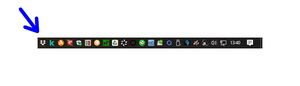
- 4 years ago
Hello everyone! I am here again. 😊
I had forgotten to say that the problem arose after the automatic Dropbox update to the current version 144.4.4491.
For the moment at least, I can say I have solved!
Two ways:
- in two computers, I first relocated the Dropbox icon in the position of the taskbar from me desired, so immediately I reinstalled Dropbox using the web-installer; after that the icon has remained correctly in its place;
- in the third computer I did not proceed with a new installation, but I acted on the taskbar settings, actually deactivating and reactivating all the visible icons and then choosing one for one which icon to display in the taskbar.
I hope I explained!
Thank you all for your attention! 😉


Toa_Of_Justice
4 years agoHelpful | Level 6
Matilda12 Reinstalling Dropbox via the web installer worked for me on Windows 11. Thanks for your help.

Whatts
4 years agoNew member | Level 2
I can also confirm that re-running the installer on Windows 11 21H2 solves the issue.
You don't have to uninstall or anything like that, just download and run the installer over the current installation, it will simply say you've updated to the new version.
About Integrations
Find solutions to issues with third-party integrations from the Dropbox Community. Share advice and help members with their integration questions.
The Dropbox Community team is active from Monday to Friday. We try to respond to you as soon as we can, usually within 2 hours.
If you need more help you can view your support options (expected response time for an email or ticket is 24 hours), or contact us on X, Facebook or Instagram.
For more info on available support options for your Dropbox plan, see this article.
If you found the answer to your question in this Community thread, please 'like' the post to say thanks and to let us know it was useful!


