Need to see if your shared folder is taking up space on your dropbox 👨💻? Find out how to check here.
Forum Discussion

wds
2 years agoExplorer | Level 4
Dropbox appears in iOS Files app but not in other apps using Files
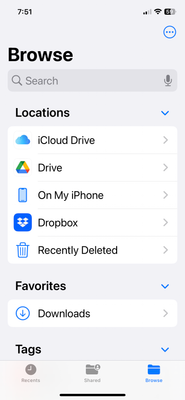
Native Dropbox For Business app works fine and is visible in iOS Files app. But other apps cannot see Dropbox when I browse file locations. I have used the three dots to edit the available locations ...

maher1982 Super User
2 years agoSuper UserHi, Can you Ensure that the Dropbox app has the necessary permissions to access files on your device. Go to "Settings" > "Dropbox" and make sure that the app has access to Photos, Files, and any other relevant permissions.
- wds2 years agoExplorer | Level 4
Yes, Dropbox has access to All Photos. There is no Dropbox setting that controls access to Files.
Regarding the native Photos app... I can use the 'Save To Dropbox' feature but Dropbox does not show up if I try to save the photo using the Save to Files feature.
- maher19822 years agoWell, in your first question, you have already tried many possible solutions for this case, such as using the edit option and ensuring that the application is up to date. However, nothing seems to work.
Let's hope that someone else in the community has another idea that can help you. - Jay2 years ago
Dropbox Community Moderator
Hi wds, If you're not on a Dropbox Basic plan with more than 3 devices connected, could you try uninstalling the app, rebooting the device, and re-installing it to see if this helps?
- wds2 years agoExplorer | Level 4
Jay,
I am a Dropbox for Business user.

About Integrations
Find solutions to issues with third-party integrations from the Dropbox Community. Share advice and help members with their integration questions.
The Dropbox Community team is active from Monday to Friday. We try to respond to you as soon as we can, usually within 2 hours.
If you need more help you can view your support options (expected response time for an email or ticket is 24 hours), or contact us on X, Facebook or Instagram.
For more info on available support options for your Dropbox plan, see this article.
If you found the answer to your question in this Community thread, please 'like' the post to say thanks and to let us know it was useful!


