Your workflow is unique 👨💻 - tell us how you use Dropbox here.
Forum Discussion

fransvandervleuten
1 year agoHelpful | Level 7
Getting errors when opening my files with Adobe after upgrading my plan to Business
(Not so) goodmorning,
I recently updated my Plus (free) plan to a Dropbox Business plan for business reasons. As a graphic designer I am struggling with Adobe After Effects, Illustrator and Ind...

Nancy Dropbox Community Moderator
1 year agoDropbox Community ModeratorI’m sorry to hear about the situation, fransvandervleuten.
Can you send me the ticket number you should’ve received from your support interaction?
Other than that, I’d like one more screenshot showing how these files appear within your local Dropbox folder, so that I can check their syncing status.
Also, what’s the current syncing status and app version of your Dropbox app?
Let me know when you’ve got more info.

fransvandervleuten
1 year agoHelpful | Level 7
Hello Nancy,
My ticket number is: #23584251.
I just figured out that my team-members experience the same problems.
Also when I am on my laptop, I have problems opening files.
My syncing status is:
(this is Dutch for that everything is good)
When I open an AE file, I get this message:
The document this window refers to is a valid Photoshop document. Nothing is wrong with it. Before my switch to Dropbox Business nothing was wrong with it.
Then I get this message:
The files are there. In the same folder they are always. Nothing is missing.
Then I get this message:
"Error reading past or end of file." I have no idea what it means, but I can say one thing. Before it did not occure.
Then I get this error. (this is all before I even click once in my project!)
Why does it want to reopen a opened file? It was not there before.
Now I am finally in my file, it says that there are two files missing.
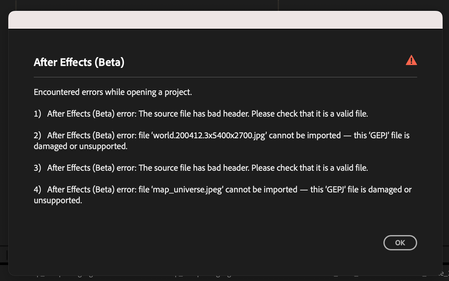
If I then relink the footage, I get this errors:
WHat is a 'GJEP' file? No idea! Nothing is damaged, nothing is unsupported.
I have no idea what it means, but I cannot relink a file that is on my Dropbox.
Last final error:
I work on two computers (a Mac Studio and a Macbook pro). I seem to have fixed it on my Mac Studio, but if I open that file op my laptop, I get the same errors. Also my team members have the same problems.
So it looks like it cannot detect the paths of some linked files, and it gives a lot of errors.
I have no idea what to do now. And this is only After Effects. Illustrator and Indesign also give problems, although the re-linking of the files works there.
Please help me find a sollution,
Frans van der Vleuten
- Walter1 year ago
Hey fransvandervleuten - sorry to jump in here, but does the issue persist if you pause syncing or quit the desktop app completely on your computer?
Have you tried reaching out to Adobe directly for further assistance perhaps since you're using their beta version?
- fransvandervleuten1 year agoHelpful | Level 7
Hello Walter,
As I said earlier, the problems started when I upgraded my plan to Dropbox Business.
It has nothing to do with Adobe After Effects running in Bete, check:
Same errors when I use the normal After Effects
- Jay1 year ago
Hi fransvandervleuten, I'd recommend contacting the support team directly for them to investigate in more detail.


About Integrations
Get help with third-party integrations from the Dropbox Community.
The Dropbox Community team is active from Monday to Friday. We try to respond to you as soon as we can, usually within 2 hours.
If you need more help you can view your support options (expected response time for an email or ticket is 24 hours), or contact us on X, Facebook or Instagram.
For more info on available support options for your Dropbox plan, see this article.
If you found the answer to your question in this Community thread, please 'like' the post to say thanks and to let us know it was useful!


