Your workflow is unique 👨💻 - tell us how you use Dropbox here.
Forum Discussion

fransvandervleuten
1 year agoHelpful | Level 7
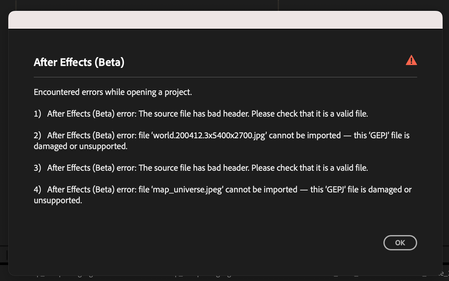
Getting errors when opening my files with Adobe after upgrading my plan to Business
(Not so) goodmorning,
I recently updated my Plus (free) plan to a Dropbox Business plan for business reasons. As a graphic designer I am struggling with Adobe After Effects, Illustrator and Ind...

fransvandervleuten
1 year agoHelpful | Level 7
Hello Walter,
As I said earlier, the problems started when I upgraded my plan to Dropbox Business.
It has nothing to do with Adobe After Effects running in Bete, check:
Same errors when I use the normal After Effects

Jay Dropbox Community Moderator
1 year agoDropbox Community ModeratorHi fransvandervleuten, I'd recommend contacting the support team directly for them to investigate in more detail.
About Integrations
Get help with third-party integrations from the Dropbox Community.
The Dropbox Community team is active from Monday to Friday. We try to respond to you as soon as we can, usually within 2 hours.
If you need more help you can view your support options (expected response time for an email or ticket is 24 hours), or contact us on X, Facebook or Instagram.
For more info on available support options for your Dropbox plan, see this article.
If you found the answer to your question in this Community thread, please 'like' the post to say thanks and to let us know it was useful!


