Need to see if your shared folder is taking up space on your dropbox 👨💻? Find out how to check here.
Forum Discussion

Kidhack
9 years agoHelpful | Level 5
In a "mdworker quit unexpectedly" loop after turning on Smart Sync
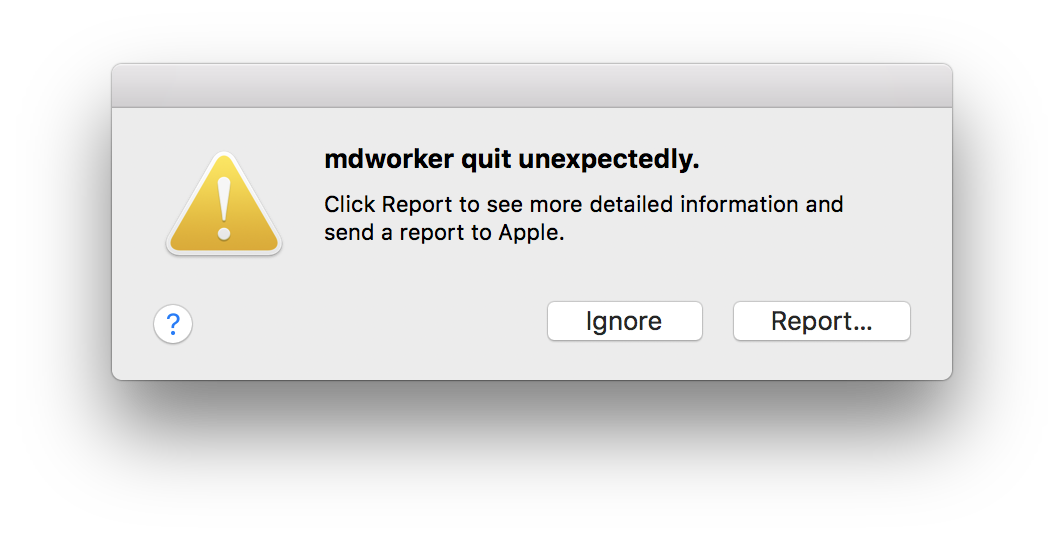
Ever since turning on Dropbox Smart Sync, Spotlight has been going nuts and using tons of CPU. The helper app "mdworker" is constantly crashing. Will report back after Dropbox finishes indexing all the Smart Sync files.
PS. Funny you can't link Dropbox photos to the image uploader in this forum.
Hi everyone,
I wanted to give you an update on the issue of mdworker crashing when reading a mismatch in the expected logical vs physical size of PDFs on Mac.
Firstly we've not forgotten about this, a lot of work has been going on in the background to resolve the issue. It has required extensive code re-writing. For those not familiar with the issue, users may see within the logs mdworker crashing. This crash is fairly silent, though will appear in logs. There's no risk to data, but for those who like to inspect clean logs this can cause a lot of noise and may be viewed as sub-optimal.
Based on the feedback raised by yourselves on this forum we've spent considerable time working toward a fix. We've changed the way we write Smart Sync placeholders (ie the files that look like files, but take up 0kb until recalled) for those on 10.13.5 and later. The new sparse format will not trigger an mdworker crash.
We've tested within the beta to validate the code and at this point have now rolled the fix / changed behavior out to 100%.
This is a forward fix, so from now on all and any placeholders created will not suffer this issue. For those who have the placeholders (the empty files with the grey cloud symbol on them) already on their machines there are a few options:
- Unlink and relink your Dropbox. Note: this will trigger a reindex of content that may take minutes to a few hours depending on your filecount.
- Remove the content, via Selective Sync, then return it. Similarly, but perhaps preferably, this will remove the placeholders then re-add them quickly and non-destructively.
There are a few other options, but those keen to avoid this error being highlighted in logs can take these steps.
Many thanks for your feedback on this issue here, it's driven a clear change in product. We pay close attention to the feedback surfaced via this channel so if you have other wishes please either add to existing threads, up-vote ideas, or create your own thread to spark discussion or development.
102 Replies
Replies have been turned off for this discussion
 Kidhack9 years agoHelpful | Level 5
Dropbox is done syncing and I restarted, but MDWORKER is still going nuts and unexpectiedly quitting.
I found this code to disable the MDWORKER and it is no longer freaking out. I'm not sure what the impact on Spotlight is by disabling MDWORKER.
In terminal enter the following to...
Disable:sudo launchctl unload -w /System/Library/LaunchDaemons/com.apple.metadata.mds.plist
Enable:
sudo launchctl load -w /System/Library/LaunchDaemons/com.apple.metadata.mds.plist
 Ross_S9 years ago
Dropbox Staff
Kidhack wrote:
Ever since turning on Dropbox Smart Sync, Spotlight has been going nuts and using tons of CPU. The helper app "mdworker" is constantly crashing. Will report back after Dropbox finishes indexing all the Smart Sync files.
PS. Funny you can't link Dropbox photos to the image uploader in this forum.
Hi there,
I'll send you an email and follow up with you via support ticket to see if we can get to the bottom of this.
Many thanks for reporting this.
- Kidhack9 years agoHelpful | Level 5
After using the code above to disable the MDWORKER, it stopped quitting. I enabled it again and it seems to be stable now. Not sure if it just needed to work through everthing or if there was a corrupt file that it got stuck on. Seems ok now, but I'll update if things change.
- Kidhack9 years agoHelpful | Level 5FYI, by disabling MDWORKER, it also disables Spotlight from conducting searches.
- Ross_S9 years ago
Ok, thanks for letting me know, post back here if the issue re-occurs and we'll look into it. :)
- Kidhack9 years agoHelpful | Level 5Installed the new OS update and it's back.
- Ross_S9 years agoThanks for letting me know, we've reached out to you by email and will investigate it and resolve the issue via that support ticket.
Many thanks for reporting this issue to us.  zobie9 years agoHelpful | Level 5
Was this issue resolved? I'm having the same problem.
- Ross_S9 years ago
zobie wrote:
Was this issue resolved? I'm having the same problem.
Hi there,
I'm still looking into it, I'll email you too so we can start a support ticket incase it's an unrelated cause.
Thanks for highlighting.
- Leno M.9 years agoHelpful | Level 5
I am having the same issue. I tried the code to disable and it has stoped for now. I have not yet enabled it again.
About Integrations
Find solutions to issues with third-party integrations from the Dropbox Community. Share advice and help members with their integration questions.
The Dropbox Community team is active from Monday to Friday. We try to respond to you as soon as we can, usually within 2 hours.
If you need more help you can view your support options (expected response time for an email or ticket is 24 hours), or contact us on X, Facebook or Instagram.
For more info on available support options for your Dropbox plan, see this article.
If you found the answer to your question in this Community thread, please 'like' the post to say thanks and to let us know it was useful!


