Your workflow is unique 👨💻 - tell us how you use Dropbox here.
Mobile
261 Topics
The Dropbox app doesn't appear among the widgets on my Android device.
Device Xiaomi Operating System/Browser (if using the web) HyperOS 2.0 Question or Issue Hi everyone, I'd like to have a shortcut to a Dropbox specific folder on Android phone screen. But if I try to add a widget to the screen, the Dropbox app does not appear... The instruction found on this page do not work at all: https://help.dropbox.com/organize/android-create-folder-shortcut. How can I solve it? Thanks43Views0likes2Comments
Dropbox for iOS cannot be installed.
Application Affected dropbox for ios Device iphone 15 pro max Operating System/Browser (if using the web) ios 26.2、26.2.1、26.3 Dropbox App Version (if using the app) (for ios 460.2) Question or Issue Ios 26.2, 26.2.1, 26.3 cannot be installed. After clicking on the app store, turn around, and then return to get it. It can't be installed. I called apple customer service and replied that the application was incompatible with 26.2. I asked for help in the community, hoping to solve it.92Views0likes8CommentsThe Dropbox mobile app is filling up my iPhone storage
I have had a Dropbox Plus account for several years. I have the latest version of the Dropbox app (460.2.2) installed on my iPhone with iOS 18.7.1. When I was unable to upgrade to the latest iOS version and when I could no longer backup my iPhone to iCloud, I found that copying photos and videos from my iPhone camera roll to specific folders in Dropbox, deleting those items from my iPhone camera roll, and then deleting all the items in the Recently Deleted folder in my camera roll did not free up storage on my iPhone. I cleared the Dropbox cache on my iPhone and confirmed that I did not have any offline files. However, I did find that the Dropbox Photos folder on my iPhone had copies of all the uploaded files. Consequently, moving photos and videos to the Dropbox cloud did not free up space on my iPhone. In the iOS Dropbox app, the Photos folder has copies of all the photos that were uploaded to specific folders in the Dropbox cloud. When I delete one of those photos from the Photos folder on the iPhone, the copy in the Dropbox cloud is also deleted! Note that in the iOS Dropbox app, I had "Camera uploads" "On" with the following pertinent settings: "Upload from" "Videos" (only that folder), "Save HEIC photos as" "JPG", "Save Live Photos as" "Live Photo". Though photos should not have been affected, I turned off Camera uploads. I ran the same test with the same result: a photo sent to a specific Dropbox folder appears (in HEIC format) in that Dropbox folder online as well as in the Photos folder in the Dropbox app on my iPhone; deleting the photo from the Photos folder in the iPhone Dropbox app also deletes the photo from the specific Dropbox folder in the cloud. The PictureEcho website recommends using the "Free Up Space" option in the iOS Dropbox app to delete the copies of the photos on the iPhone and not on the Dropbox cloud, but I cannot locate that option anywhere in the Dropbox app on my iPhone. Restarting the Dropbox app does not make a difference. Reinstalling the app including removing all the Dropbox data stored on the iPhone would solve the immediate problem but would not address the bigger issue: as-is Dropbox is only useful for sharing (unannotated) photos and videos that I don't mind also storing on my iPhone. Since I have a backup service for my (Windows) laptop, without a solution I'll go back to moving photos and videos from my iPhone to my laptop. This greatly diminishes the justification for paying for a Dropbox Plus account. The "Free Up Space" option would help but I question the multiple steps required. In iOS select two photos, upload to Dropbox, close the Dropbox upload window, reselect the two photos, delete, open the "Recently deleted" folder (album?) and delete the two photos (or delete all). In the Dropbox app on the iPhone, select "Free Up Space" and then (as needed) delete the cache. Then there's the issue of the comments added to a photo in iOS (apparently) not getting stored in Dropbox. In Dropbox online I can view a photo with the iOS HEIC extension and view the basic HEIC metadata, but I cannot view comments added in iOS. I can add comments in Dropbox but presumably those comments are not visible in iOS (or on my Windows laptop) outside of the Dropbox app or website.134Views0likes10Comments
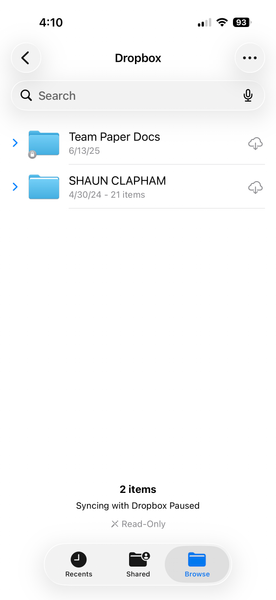
I'm trying to add Dropbox as a location in Files app, but it says syncing is paused.
I cannot use dropbox as a location to select files from on iphone ios 26.2.1 I have restarted, installed everything over and over. Removed preview app, and nothing. Application Affected dropbox on iphone Device iphone 17 pro ios 26.2.1 Operating System/Browser (if using the web) files iphone app Dropbox App Version (if using the app) 460.2.2 Question or Issue Need a solution88Views0likes2Comments
Unlink Dropbox app version 2.3.5.10 from Android handset
Hello, I have an old android handset - HTC- One with Dropbox app version 2.3.5.10. I am unable to unlink device from Dropbox. A message occurs Error: ' you must be online to unlink. Check your connection or try again'. However, I am connected to WiFi. I can access the website on my other devices laptop and mobile, but the old handset is not listed on the basic Dropbox account I have. Appreciate if you can advise please. Thanks50Views0likes1Comment
Cannot access Dropbox on Kindle Fire Max 11
Application affected, Dropbox, Kindle Fire Max 11 Device: Kindle Fire Max 11 Operating System: Fire OS 8.3.3.8 Dropbox App version: Latest For the last few years I have used Dropbox almost daily, importing files into Songbook Pro. At the end of December I retired my Fire Max 11 and bought a new one. It has been working fine, but about a week ago I can no access Dropbox on my Fire Max 11 (I have plenty of room in Dropbox). The problem first started when I would log into my Mac's Kindle Dropbox, import a file to it, but nothing new would appear on my Dropbox Kindle, just older items. The last one I imported worked fine, but then it could not be deleted from Dropbox when I was through with it. Now when I would try to sign into Dropbox (on the Kindle) I get a message, "Can't connect to Dropbox. Make sure you're online, or try again later." I can still access Dropbox on my desktop Mac, no problem. I have twice deleted and reinstalled Dropbox on the Kindle, and numerous times restarted the Kindle. I have no problems with any other app. One month ago I retired my Fire Max 11 and bought a new one. I still have it, I suppose I could reregister it and see if it would work?198Views1like7Comments
iPod won't Connect to my Dropbox account.
Hello. I have an iPod running iOS 12.5.8. When I try to login to my account using the iOS app I get the following error, "Unable to Connect to Dropbox There may be a problem with your iPod's internet connection". There is no problem w/ my internet connection. I can connect to the internet fine. When I try to login from my iPod using Google I get an 'invalid" email address error. I know this email is correct b/c I can log in from my desktop. This used to work fine but suddenly stopped working. And yes I tried deleting and reloading the app and it still does not work. I don't have cellular data options on this iPod.148Views2likes6Comments
Legacy Dropbox Android App breaks on Android 4.4/6.0.1 (Vertu Aster/BB Priv)
Application Affected (Dropbox Android app.) Device (Vertu Aster, Blackberry Priv) Operating System/Browser (Android 4.4.2, Android 6.0.1.) Dropbox App Version (314.2.4, 190.2.2) Hello I have been a long-time Dropbox user and rely on your service for storing and accessing important files across multiple devices. My primary concern involves the sudden loss of functionality in older versions of the Dropbox Android app on legacy hardware. On my Vertu Aster phone (running Android 4.4.2 KitKat), the official Dropbox app version 190.2.2 (released in 2020, the last build officially supporting Android 4.x) worked reliably for years until very recently (around 26 January 2026). Now it no longer connects: Network error. Retry later" This happened abruptly without any app update on my end. Similarly, on another device (BB Priv), version 314.2.4 (from February 2023) stopped working the same way "until today" after functioning perfectly for years. In contrast, an even older setup, my trusty iPhone 4S on iOS 6 with a legacy Dropbox app version—continues to connect and access files without issues. I understand that Dropbox enforces modern security standards, such as the API server root certificate update effective January 2026, which likely affects outdated clients. However, devices like the Vertu Aster are premium, non-disposable hardware built for longevity (handcrafted luxury materials, no planned obsolescence), and Android 4.4 was its final official OS (no updates available from the manufacturer). Many users with similar vintage or niche devices are affected, and there are forum reports of comparable issues on older iOS versions as well. My questions/requests are: Is there any possibility of a temporary workaround, exception, or legacy endpoint access for very old clients to restore basic functionality (e.g., file viewing/sync on Android 4.4.2)? Could you confirm if the recent certificate/API changes are the root cause, and whether third-party apps like Dropsync (Autosync for Dropbox, version 6.5.1 or similar) are still fully compatible with the current backend? (I plan to test Dropsync as an alternative for autosync on the Vertu.) If legacy support is permanently ended, is there any recommendation for accessing files on such old Android devices beyond the web interface (dropbox.com in browser), which works but lacks automatic/background sync? I value Dropbox's service and have no intention of switching providers, but maintaining access on my existing hardware is important to me. I appreciate any insight, guidance, or escalation you can provide. Thank you in advance for your time and assistance. Best regards, Victor [personal information removed per the Community's Guidelines]135Views0likes1Comment