Your workflow is unique 👨💻 - tell us how you use Dropbox here.
Forum Discussion

Mumdoesthewashing
1 month agoNew member | Level 2
Error on switching back to available offline sync option
I am on MacbookPro M1 2020, running Tahoe 26.1.
I have set the settings in Dropbox Admin to offline is enabled, my personal account is fine but my business account, for which I am admin will not let me switch and gives me "Failed to save. Please ensure the Dropbox system extension is enabled for your account." error.
19 Replies
 vanzeller1 month agoNew member | Level 2
Hi yes the issue persists on firefox, safari and Brave. See attachments for Firefox and Safari. I am on the basic free plan.
- Walter1 month ago
Dropbox Community Moderator
Sorry to jump in here, but if you get the same results on other browsers as well, can you clarify what Dropbox plan you are on at the moment vanzeller?
- vanzeller1 month agoNew member | Level 2
Yeah that's my problem, it's not there, see screenshot!
- Jay1 month ago
It should be at the bottom of the General settings which was linked previously.
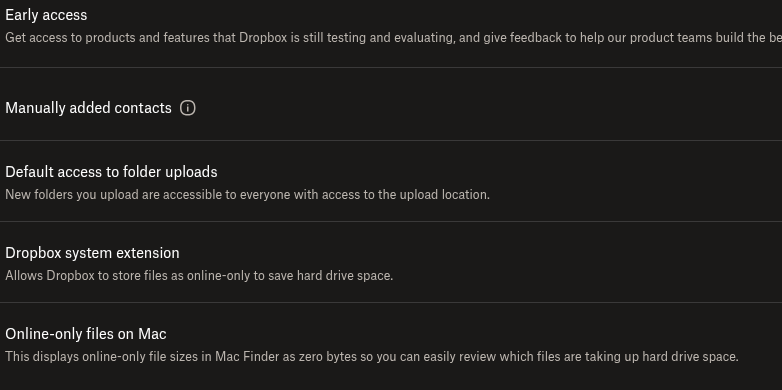
If you're not seeing the option there, could you take a screenshot of that section?
- vanzeller1 month agoNew member | Level 2
Hi Jay. That link takes me to the personal account settings. I don't find any setting labelled "dropbox system extension". Is it under any of the sub-menus (General, Security, Notifications, Apps, Branding, Refer a friend, Privacy, Sharing)? Or is it under another settings menu? Please clarify thanks
- Jay1 month ago
HI vanzeller, could you check if the Dropbox system extension is enabled on this page when logged into your Dropbox account?
- vanzeller1 month agoNew member | Level 2
Hi I am facing the same issue. I want all files to be stored locally at all times and synchronized as changes occur. When I activate "Available offline", I get the same error as the user above.
I ahve rebooted several times. I am the admin of the machine. Full disk access is granted to dropbox. OS and app are up to date. Macbook air m4. MacOS Tahoe 26.2; Dropbox version v240.4.8493.
Please advise. Thanks
- Nancy1 month ago
Hey Mumdoesthewashing! Are you still having issues when trying to make files available offline on your Dropbox team account?
Let us know, if you need any further help.
- Walter1 month ago
Hey Mumdoesthewashing - sorry to hear you're having issues with this.
Can you please clarify if this persists after rebooting your computer and/or quitting and relaunching the Dropbox desktop app?
If it does, you can try reinstalling the app and let us know how it goes.
Thanks!


About Create, Upload, and Share
Find help to solve issues with creating, uploading, and sharing files and folders with Dropbox.
The Dropbox Community team is active from Monday to Friday. We try to respond to you as soon as we can, usually within 2 hours.
If you need more help you can view your support options (expected response time for an email or ticket is 24 hours), or contact us on X, Facebook or Instagram.
For more info on available support options for your Dropbox plan, see this article.
If you found the answer to your question in this Community thread, please 'like' the post to say thanks and to let us know it was useful!


