Your workflow is unique 👨💻 - tell us how you use Dropbox here.
Forum Discussion

mathijsw
5 hours agoNew member | Level 2
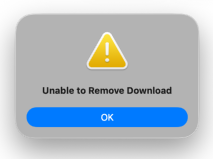
We're getting a "Unable to remove download" error when selecting the online-only option.
Device
(Macbook Pro M2) Operating System/Browser (if using the web)
(macOS 26.3) Dropbox App Version/Browser Version
(243.3.6933)
Issue We are using Dropbox via File Provide...

mathijsw
1 hour agoNew member | Level 2
Thank you, Nancy, for your response.
We received a ticket from one of our customers regarding this issue. I then set up a VM where I was able to reproduce the problem.
It doesn’t make a difference whether I restart or perform a clean installation. I’ve mainly been testing with Pages, Numbers, and Microsoft Office files, but the customer also reports that it occurs with Adobe files.
See here:
https://youtu.be/wtL6ZN7kSmM
- Megan23 minutes ago
Dropbox Community Moderator
Hi there, mathijsw, let me jump in here!
As a first step, please let me know the app's current syncing status.
Also, based on the app version that you're using (243.3.6933) it sounds like you have the beta version installed instead of the stable one. That could be the culprit there.
Can you try to uninstall Dropbox from your computer using these steps?
Once you do this, please access your account settings online and then toggle the Early Access setting to Off. After that reinstall the stable version using this link.
I'll be waiting for your update once you try this, to let me know if the behavior remains the same.
If it does, please let me know!

About Create, Upload, and Share
Find help to solve issues with creating, uploading, and sharing files and folders with Dropbox.
The Dropbox Community team is active from Monday to Friday. We try to respond to you as soon as we can, usually within 2 hours.
If you need more help you can view your support options (expected response time for an email or ticket is 24 hours), or contact us on X, Facebook or Instagram.
For more info on available support options for your Dropbox plan, see this article.
If you found the answer to your question in this Community thread, please 'like' the post to say thanks and to let us know it was useful!


