Your workflow is unique 👨💻 - tell us how you use Dropbox here.
Forum Discussion

ECRFF
2 years agoNew member | Level 2
Excel sharing violations when saving to Dropbox
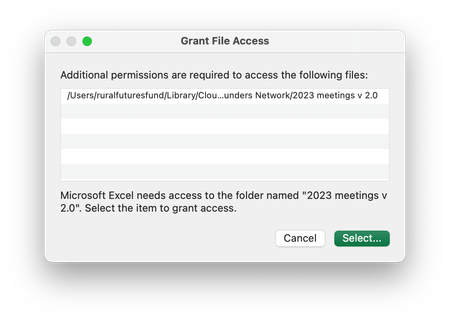
I just started having problems saving Excel files to Dropbox yesterday.
First, I get this message:
Then when I click select, I get this:
Then when I click okay, I get...

Janine45
1 year agoNew member | Level 2
Janine45
1 year agoNew member | Level 2
- Janine451 year agoNew member | Level 2
When I access the files through the web instead of on my local drive, I can see the updates so I think it's ok. I made an excel file copy just in case though and that won't save to Dropbox locally or my desktop so I think the issue is with Excel. If I can see the file updates online on Dropbox will they definitely be there if I abandon the Excel copy in order to check the Excel status?
- Janine451 year agoNew member | Level 2
I should also clarify that all the work I did on this spreadsheet was done online on Dropbox as I couldn't open the file any other way. I'm not sure of file size. Where can I view that?
- Janine451 year agoNew member | Level 2
Hi Walter, no, not yet. But I will do in the morning. Have to finish for today. Thanks
- Janine451 year agoNew member | Level 2
Morning Walter, all appears to be working now. I had a colleague check they could view my changes on Dropbox files, then I shut everything down and did a full reboot. Fingers crossed the issue is fixed. Thanks for your help


About Integrations
Get help with third-party integrations from the Dropbox Community.
The Dropbox Community team is active from Monday to Friday. We try to respond to you as soon as we can, usually within 2 hours.
If you need more help you can view your support options (expected response time for an email or ticket is 24 hours), or contact us on X, Facebook or Instagram.
For more info on available support options for your Dropbox plan, see this article.
If you found the answer to your question in this Community thread, please 'like' the post to say thanks and to let us know it was useful!


