Your workflow is unique 👨💻 - tell us how you use Dropbox here.
Forum Discussion

Pascale2
6 years agoHelpful | Level 5
Folder upload fails on Dropbox.com
Hi, I just started with Dropbox Plus. I tried to upload large folders to Dropbox, which took quite a long time (sometimes about 2 days for some of the folders).
When the uploading was finished, I got reports mentioning that large amounts of files could not be uploaded (180, 450 files...)!!
Can I resume the uploading of the missing files only? or do I have to remove the whole folder from Dropbox and start uploading again? (with the risk that some files will be missing once more).
BTW, I did not see any Zip folders being uploaded to Dropbox as it's been mentioned in some of the tutorials.
Thanks for the help!
There is. Theres a feature called Selective Sync. In the settings, you go to Sync tab, and go to Selective Sync. You select which folder that you WANT to see on your Hard Drive. The folders that is not picked, the Client will delete from Harddrive but will keep on the cloud. This sounds like what you want.
More info here: https://help.dropbox.com/installs-integrations/sync-uploads/selective-sync-overview

28 Replies
Replies have been turned off for this discussion
- Pascale26 years agoHelpful | Level 5
Thanks!!! I’m going to check the links you send me. ‘
Do you have any solution for this issue:
”I am working on a Photoshop file on my MacBook from the Dropbox folder. But my computer is getting really slow. The bamboo pen of my Wacom tablet also sometime stops responding. How can I make sure I use Dropbox files with the same work flow that I am used to?”
Thanks!!!
- Fiona6 years ago
Dropbox Staff
Thanks for getting back to me about this Pascale2.
For any Wacom drivers for a pointing device, such as a graphics tablet, please attempt to update them to the latest version first. To update drivers on Windows 10, you can follow the instructions here. If updating the driver is not sufficient, you may have to uninstall the Wacom application and any elements of it on your system in order to resolve any issues. After you have done this, you can test Dropbox to see if the issue persists. Once those instructions are complete, you can attempt to reinstall the Wacom application and see if the issue returns.
Reading/opening and editing files can slow down things in general and I would have further questions to ask to further troubleshoot this, but the Operational issue you reported needs to be checked first before we further investigate anything else.
If your apps are having trouble reading from the hard drive, what you are describing is expected.
Let me know how this goes. I want to help you further with this.
Thanks!
- Pascale26 years agoHelpful | Level 5
Hi Fiona, I am busy making space on my hard drive to make sure my computer works faster.
There is something I don't understand about the way files are saved on Dropbox: I put all folders that I don't use anymore as "online-only" to save space on my local hard disk. However, via " About this mac / Storage / manage", I get to see my largest files (to delete them if appropriate), but most of these large files that I get t see are actually now located on Dropbox as "online-only".
So it seems that my Online-only files still use space on my local hard drive.
Can you explain to me how this works?
Thanks!
- Chris_J6 years ago
Super User alumni
Hello Pascale2
While you wait on Fiona to answer, I thought I will also try to help. Can you do this for us? Go to a large file that you have stored in Dropbox that is supposed and selected for 'Online-only' and highlight the file and do a 'get info' on it? press command key + i and tell me how large the file. FYI, if it's truly online, you would see a thumbnail and it shouldn't be very large.
This should tell us whether it's working
Check out this Help Center article: https://help.dropbox.com/installs-integrations/sync-uploads/smart-sync
- Pascale26 years agoHelpful | Level 5
Thanks for your quick reaction.
I get this for example for a Online-only file: "1,380,724,058 bytes (Zero bytes on disk)"
- Chris_J6 years ago
Thanks for sharing that info. This tells me that the file has 0 bytes which don't add any data on your Hard drive so maybe perhaps, you were seeing something different?
If you look at the Help Center Article I linked to, it shows the badges that show on the files. Is it like this?
- Pascale26 years agoHelpful | Level 5
Yes, I do have such a cloud icon.
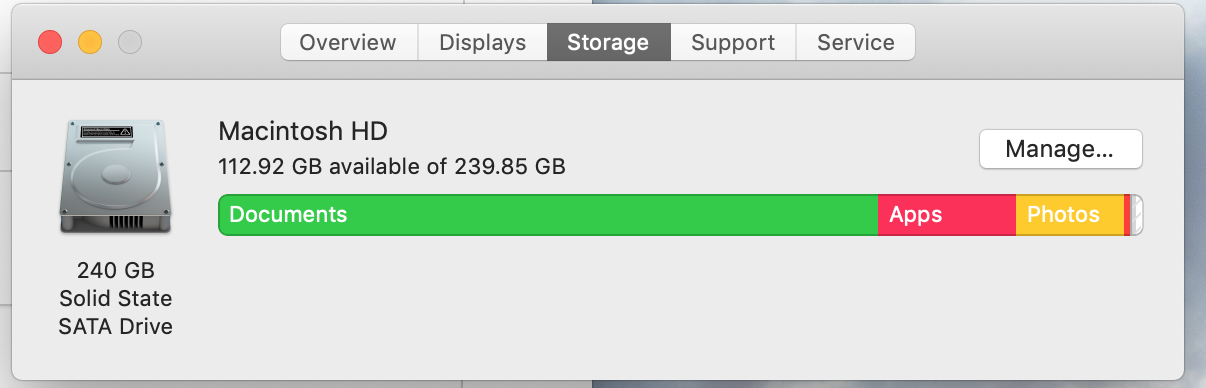
However I get this info:
which is not logical: the graphic shows my disk is almost full, whereas the info above says that half of my space is used.
Any idea why this is so? before I use Dropbox, the graphic was at half of the level of total storage.
thanks!
- Pascale26 years agoHelpful | Level 5
See my screenshot here:
- Chris_J6 years ago
Okay, this was a topic years ago and its might have changed. Anytime, a person or even an app deletes the files from Dropbox, it saves the file in a hidden folder. They do this for easier restoration. The Client should delete the hidden cache after a couple of days.
If the files used to be on the Harddrive and you initialize smart sync to online, perhaps the files go into this hidden cache
I am going to check on where to find this hidden folder used for cache and post m findings
- Chris_J6 years ago
According to this Help Center Article: https://help.dropbox.com/installs-integrations/desktop/cache-folder
you can delete the cache. Try deleting the cache folder as shown in the article and see if this changes anything


About Create, Upload, and Share
Find help to solve issues with creating, uploading, and sharing files and folders with Dropbox.
The Dropbox Community team is active from Monday to Friday. We try to respond to you as soon as we can, usually within 2 hours.
If you need more help you can view your support options (expected response time for an email or ticket is 24 hours), or contact us on X, Facebook or Instagram.
For more info on available support options for your Dropbox plan, see this article.
If you found the answer to your question in this Community thread, please 'like' the post to say thanks and to let us know it was useful!


